Showing posts with label website. Show all posts
Showing posts with label website. Show all posts
Tuesday, March 7, 2017
How To Download A Whole Website On PC For Offline Reading And Browsing
How To Download A Whole Website On PC For Offline Reading And Browsing
It’s rare but many of the internet techies and geek want to download some of their favorite websites entirely and read offline. Research is the major reason. However, some people want to download some websites because they don’t have internet on their computer and they eventually get internet access from somewhere like their friend’s home, cybercafe etc.
1. Downloading Individual Web Pages
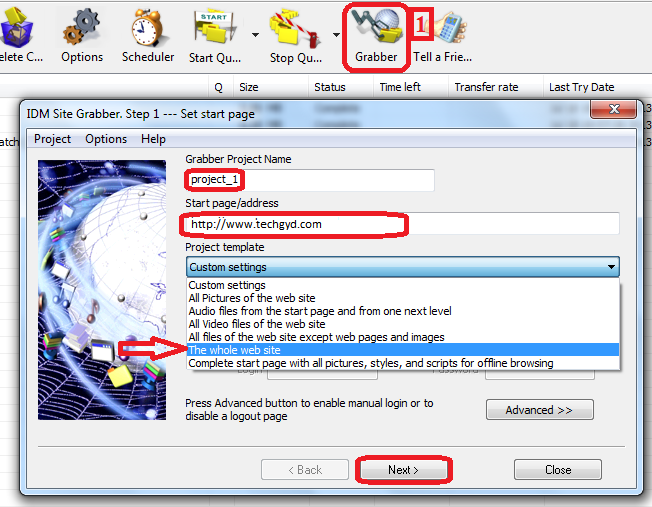
Lets say, if you are researching for a very important project topic and you landed to a Wikipedia article. Now, you want to download the entire webpage. The most comfortable trick is to “clip” the article at Evernote which aims to become your personal on-and-offline repository of knowledge. You can also use pocket app. Both the tools let you to read clipped articles anytime at desktop or mobile.If you want to download the webpages linked to the articles too, there is nothing better than using Site Grabber tool of Internet Download Manager. Just start a project here, and specify how deep you want IDM to do and download webpages and then run Site Grabber it will automatically download the webpage as well as the linked webpages.
2. Downloading Latest News/Blog Articles
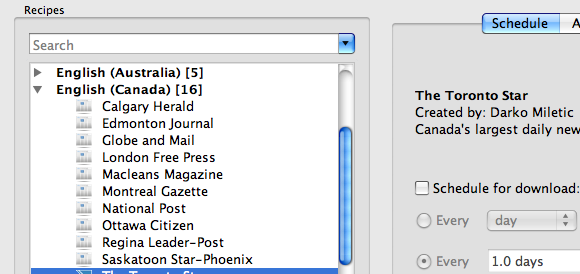
If you want to download latest articles or a week or so, of a blog or website then try Calibre. Calibre downloads latest articles in a eBook. You can choose eBook formats from the Kindle to the Nook to the Kobo and everything in between. Just enter website’s url and this software will automatically list its latest articles. Select the ones you’re interested in and start the process.
3. Downloading Entire Website
Here comes the pain. If you want to download an entire website then it can be very complicated and time-consuming task but don’t worry, we have a great tool which is making whole website download easy and automatic. So, you don’t need to do complicated tasks or invest your precious time.
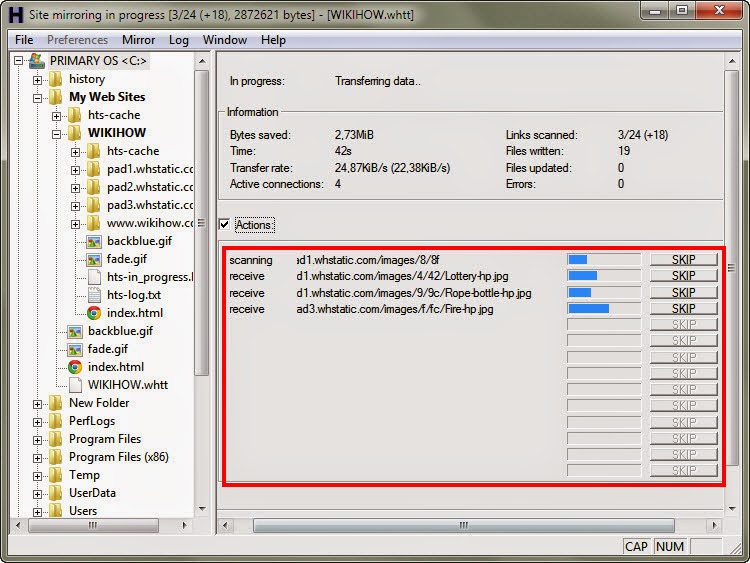
Simply open a page of the “mirrored” website in your browser, and you can browse the site from link to link, as if you were viewing it online. HTTrack can also update an existing mirrored site, and resume interrupted downloads. HTTrack is fully configurable, and has an integrated help system.
Dont Forget To Like And Follow..

Available link for download

Saturday, February 4, 2017
How People Reach Your Website From Google Search Results
How People Reach Your Website From Google Search Results
Okay, so you entered a keyword or search query to Google and it came out with millions of results in a second with most popular and quality content in the first page.
Have you ever wondered who Google manages to show a few results in the first page in these millions of results? And even though you can see page numbers in the bottom but 94% users visit only pages in the first page. They find most relevant information in these pages so they don’t bother to look into the second page even.
So, understand your target is to appear in Google’s first page. Let us find out how you can make it to first page. There are a number of criteria Google uses to select sites. Have positive and relevant content on your first page. Your first page makes your reputation.
Here are the tips, one must follow to appear in first page in Google search results. Don’t miss this infographic below.
 I Hope This Article Helps You If You Getting Any Problem Related To This Article You Can Comment By Below Comment Box We Will Help You And If You Need Any Trick Or Software Or Hack You Can Mail Us We Will Try To Give That Article We Happy To Help You All Guys.Thank You Share And Subscribe Us. #Pankaj Patidar Rock
Have you ever wondered who Google manages to show a few results in the first page in these millions of results? And even though you can see page numbers in the bottom but 94% users visit only pages in the first page. They find most relevant information in these pages so they don’t bother to look into the second page even.
So, understand your target is to appear in Google’s first page. Let us find out how you can make it to first page. There are a number of criteria Google uses to select sites. Have positive and relevant content on your first page. Your first page makes your reputation.
Here are the tips, one must follow to appear in first page in Google search results. Don’t miss this infographic below.

Dont Forget To Like And Follow..
Available link for download
Subscribe to:
Posts (Atom)