Showing posts with label account. Show all posts
Showing posts with label account. Show all posts
Tuesday, February 14, 2017
How To Hack WhatsApp Account 2014
How To Hack WhatsApp Account 2014
In Todays Generation Most Used App For Communicate To Use WhatsApp. WhatsApp Is Best And Fast App To Chat Or Sharing Video/Audio.

WhatsApp Messenger Is A Cross Platform Quick Messaging Application. WhatsApp Is Assured Really The Foremost Fashionable Quick Electronic Messaging For Smartphones. WhatsApp Messenger Is Accessible For Iphone, Android, Windows Phone, Blackberry And Nokia And Yes, Those Phones Can All Message Each Other. And You All Have Heard Of It If You Are Not Using It. Given Below Are The Several WhatsApp Hacks Or Tricks You Should Know If You Are Using WhatsApp.
Now Done You Will Now Receive Messages Expected For The Spoofed Number On Your Mobile Device And You Can Communicate With People Under The Spoofed Number.
I Hope This Article Helps You If You Getting Any Problem Related To This Article You Can Comment By Below Comment Box We Will Help You And If You Need Any Trick Or Software Or Hack You Can Mail Us We Will Try To Give That Article We Happy To Help You All Guys.Thank You Share And Subscribe Us. #Pankaj Patidar Rock

Steps To Hack WhatsApp ~
All You Need Is To Get Access To Victim Phone To Get The Victims Phone “MAC Address Along With The Verifying Massage” Which Is Acquired To Verify Your Device.- Get Mac Address On Your Android Phone.
- Finding Mac Address On An Android Phones
- On Your Phone’S Home Screen, Click On Menu, Then Go To Setting.
- Click On About Phone.
- Click On The Status.
- And Then View Your Wi-Fi Mac Address.
- As Soon The Message Is Received Push The Mac Address As Well As Verifying Code To Your Server Or Mail It Your Id That Banks On Your Convince.
- Cheat Your Phone’S Mac Address To The Victims Address And Install Whatsapp And After That Type The Verify Code.
- And Now Its Done. You Get Full Access To The Victim’S Whatsapp Id. So Now You Can Keep Spying/Watching Your Victim’S Movements.
- That Means You And The Victim Is Using The Same Id From Different Devices.
- Whatsapp Hack To Use It By Not Using Your Number
- This Hack Works By Cheating The Whatsapp Verification Servers By Sending A Spoofed Request For An Authorisation Code Expected For A Different Phone.
- Install Whatsapp On Your Device. Whatsapp Now Opens A Counter Where It Sends A Verification Message To Its Servers.
- Block The Message Service – It Can Be Blocked By Changing The Message Centre Number Or Turning The Phone Into Airplane Mode.
- Whatsapp Now Gives A Substitute Method Of Verification – Select Verify Through Sms And Fill In Your Email Address. Once You Click To Send The Sms Press Cancel To Abort The Call For Authorisation To The Whatsapp Server.
- Now You Have To Do Sms Spoofing.
- Examine Your Outbox And Copy The Message Details Into The Spoofed Application And Send The Spoofed Verification.
I Hope This Article Helps You If You Getting Any Problem Related To This Article You Can Comment By Below Comment Box We Will Help You And If You Need Any Trick Or Software Or Hack You Can Mail Us We Will Try To Give That Article We Happy To Help You All Guys.Thank You Share And Subscribe Us. #Pankaj Patidar Rock
Dont Forget To Like And Follow..
Available link for download

Wednesday, January 11, 2017
How To Recover Lost Microsoft Account Password From Phone
How To Recover Lost Microsoft Account Password From Phone

Many time it happens with many peoples that they Create there Microsoft Account to use there Windows Phone & they forget Password.
And When there phone asks for password to Login Then they Dont know what to do.
You Are Facing This Problems?
- Lost Your Microsoft Password?
- Your Windows Phone Always Asking To Enter Your password which You Forgot?
- Cant Download Anything From STORE?
Here I will help you, Just Follow the Steps Below.
Steps:
- Visit http://www.login.live.com form your computer or from your windows phone ( Using internet Explorer )
- Then select the option Cant access your account?
- Than it will ask you Why are you having trouble signing in? just select the circle for I forgot my password & Click NEXT.
- Just Enter Your Email Id & the Character in image for verification & click NEXT.
- Then it will ask you How would you like to get your security code? select any of 2 from Options. ( either your phone number or your alternate Email Id )
- Now Open a new window/tab and check your Inbox of alternate email & copy the code that received & paste to the Microsoft page from first window/tab. ( Do the Same if you select the option of phone number )
- You Are almost done just Enter Your New Password & click NEXT. ( Now Dont forget the new password )
- Now on your phone enable WI-FI or Internet Connection & go to Settings>email+accounts>Microsoft account now wait till it load and Enter your new password.
If you still facing the problem, then comment below Ill help you.
Thanks For Reading.
Stay Connected With Us
Like our Facebook Page
Join our Facebook Group
Available link for download
Wednesday, November 9, 2016
How To Prevent Google Adsense Account From Getting Banned
How To Prevent Google Adsense Account From Getting Banned
Google Adsense is the easiest way to make money like if you are a novice blogger and you do not have enough income from sales or from affiliate programs. A huge number of bloggers have great hopes for Adsense, but in the end they can expect failure and their reputation becomes unfavorable, they fall into the list of ”Banned In Adsense.” This problem is most prevalent that we hear from Geeks.

How to Prevent Google Adsense Account From Getting Banned ?
- Never Click On Advertisement On Your Own Page - Get an incredible amount of money by clicking on advertisements on your own same page – haha,what do you expect ? This is the most stupid thing that any blogger can do. Adsense has streamlined tracking algorithms for the requests that come, so that if they find out that, you have clicked on the ad on your page, it’s just over, banned on Adsense.
- Do Not Ask Friends To Click On Your Advertisement - If you suddenly decide that you can outsmart Google, asking friends to view ads, instead of doing it yourself – think again. Google can easily view the history of queries and find out where the individual user, clicks on an advertisement. So, to detect fraud there is no difficulty for the corporation. This can also lead to getting your Adsense account blacklisted.
- Do Not Post Adult Content - Adsense in no way endorses the presence of adult content on blogs and websites. You should not be anything like – it’s simple and clear. Try to fill your blog solely to the content that is appropriate for any age category. Adult content is not allowed.
- Do Not Distribute Content That Is Protected By Copyright - Never post material on your website, to which you are not the owner of that. You can spread a certain copyrighted material only if you have written permission from the owner of the content.An example of the different variations of content, which may fall under copyright law:
1.Various pictures and photos
2.Videos
3.Copied from various blogs articles
4.Apps
5.Themes and elements of design
- Do Not Distribute Links To Illegal Content - By providing links to sites that are distributing material protected by copyright, which is laid out without the permission of the author, or to sites with adult content, or for gambling sites that have a bad reputation, also increases the risk of a banned on your Adsense account.
Never lay links to other websites and blogs that look suspicious. Always double check the sites, make sure that they are safe, so that you will not have any problems in the future. - Do Not Spread Viruses On The Site, As Well As Any $Other Malicious Software - Always check your blog or website for malware, as it can either be infected or you unknowingly posted a malicious program. Such sites immediately gets blacklisted after the detection.
Malware and viruses can not always be controlled, but if they are detected, they must be removed.
If you have suspicions that your site is infected, immediately turn off the ads in order to avoid being banned from AdSense. You can re-enable ad at any time, as soon you get rid of viruses. - Publish The Privacy Policy - Make a page that lists the rules of Privacy Policy on the website, where users can learn how to use Adsense cookie-files and scan the individual data for each user, to choose the best advertising that might interest the end user. This is one of the mandatory requirements of Google, though the specific implications for the absence of such a page are not registered anywhere.
Some visitors may not like the fact that Google uses the history of search queries to select the ads, they might want to turn off this option, so you have to give them that opportunity. - Do Not Modify The Adsense Code - Never, under any circumstances, change the code given to you because this is a direct violation of the treaty. You may have seen some untwisted sites where ads look quite different. This is because they are a premium service publishers of AdSense, and they have individual opportunities. Use Adsense code in a form in which it was provided by adsense.
- Do Not Place The Images On Your Site Next To An Ads - Google Adsense has a rule, which that is if an advertisement is near a specific image on your site, it could lead to manslaughter clicking on advertising because the user will think that advertisement that is just a kind of picture. So, do not place ads next to images. Of course, some sites uses this technique, but it always entails additional risks.

- Beware Of Bombing Clicks - Try to avoid a ban for wrap counter clicks. There are people who try to click on advertisement a lot of times, thereby creating an artificial cheat. Difficult to explain why some people have pleasure in giving trouble to strangers, but you should keep this fact in mind.
Always check the history of events in the Adsense Analytic, whether there are any inconsistencies in the user activity and number of clicks on advertisements. If you notice something suspicious, promptly report it to Google so that they can reduce the number of clicks and thereby protect advertisers. Friendly lots of clicks and wrap counter is the most common reason for the blocking of Adsense accounts, and it may not always be the fault of the author’s website.
Dont Forget To Like And Follow..
Available link for download
Sunday, October 9, 2016
Htc G1 Hard Reset and Google Account sing in solution
Htc G1 Hard Reset and Google Account sing in solution
tags: cara mudah root cross a27 tanpa pc, rooting android tanpa komputer, 100% work, aplikasi untuk root, spesifikasi, harga, kelebihan, kekurangan, xda developers, kaskus, official, how to root, custom rom, stock rom, cwm, recovery, flashing, hp cina
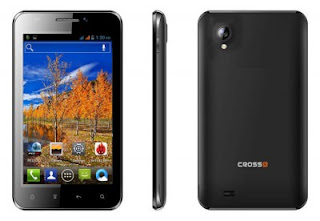
- Download Framaroot DISINI , kemudian copykan ke sdcard lalu install.
- Aktifkan Unknown Source di menu Settings > Security > Unknown Source.
Cara Root:
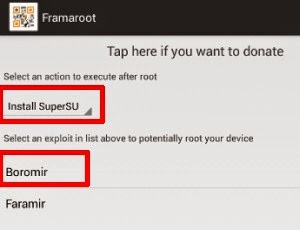
- Jalankan aplikasi Framaroot yang sudah terinstall tadi.
- Di opsi teratas, pilih Install SuperSU.
- Sedangkan di opsi kedua di bagian bawah pilih Boromir.
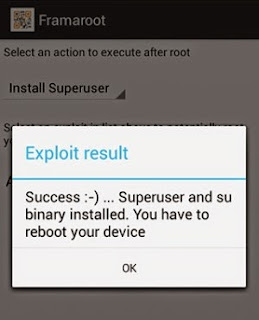
- Jika proses root berhasil akan muncul pemberitahuan “Success…Superuser and Su binary installed. You have to reboot your device“
- Reboot Cross A27 Anda.
- Setelah menyala kembali di menu utama akan muncul aplikasi SuperSU.
- Gunakan aplikasi Root Checker untuk cek status hp Cross A27 Anda sekarang.
- Jangan lupa untuk cek juga di bawah ini:
Available link for download
Subscribe to:
Posts (Atom)