Saturday, December 3, 2016
FIX for Monkey Test Time Service Virus Without Flashing
FIX for Monkey Test Time Service Virus Without Flashing
Hello everyone,
This method Im going to write is tried on my own Lenovo A7600-H Kitkat 4.4.2 tablet, which I did not flash because Im not sure about stock roms available on the net. If I had found a reliable rom I wouldnt be able learn this
To remove this virus you need to install busybox, Terminal emulator, Root explorer pro and you must have Supersu not superuser which is installed by Kingoroot. If you have rooted your device with kingoroot, so you need to change that.
Here is how to change that:
Google this: how to get ride and replace kinguser with supersu app (Follow first zidroid link)
Im not able to submit links so im going to write the exact apps with developer names to download from Playstore.
Busybox Installer by JRummy Apps Inc.
Terminal Emulator by Jack Palevich
Root Explorer Pro by Speed Software
Once you have installed everything here is what to do in steps:
[Note: USB DEBUGGING MUST BE ENABLED Turn on Usb Debugging by going to settings> developer options> Usb debugging]
1) Turn off wifi/3G/4G, and then go to settings> apps> all> disable time service and monkey test. (If already frozen via titanium backup or other app) skip this.
2) Open Root explorer go to system/xbin and see if there is any file starting with a dot (eg: .ext.base) also note that every (.) file has diff permission then the rest of other files. So just remember those files with dots because those are the one that youre going to remove in terminal emulator.
3) Go back to system and then go to Priv-app folder and look for these two files
[1] cameraupdate.apk [2] providerCertificate.apk and also notice permission of these two files are different then the rest of Apks so these two are the base of MT TS virus and needs to be deleted.
4) Open Terminal Emulator OR if you have access to your device via adb from a computer.
5) WHAT TO TYPE IN TERMINAL EMULATOR or ADB (CMD Windows)
adb devices (Type this line if youre using adb Windows)
adb shell
su
mount -o remount,rw /system
cd system/priv-app
chattr -iaA providerCertificate.apk
rm providerCertificate.apk
chattr -aA cameraupdate.apk
rm cameraupdate.apk
cd ..
cd system/xbin
chattr -iaA .b
rm .b
chattr -iaA .ext.base
rm .ext.base
chattr -iaA .sys.apk
rm .sys.apk
[NOTE: If you are using older version than KK you need not to type priv-app just type cd system/app]
6) Please make sure you type the file name correctly just as providerCertificate C is capital otherwise permission wont change.
7) Exit Emulator/ADB
8) Go to settings> apps> all> send me the screenshot if you have Monkey test or Time Service there
9) Im 100% sure if youve followed everything as I mentioned you are good as new and you dont need to flash.
10) Im not a developer and Thats it!
This method Im going to write is tried on my own Lenovo A7600-H Kitkat 4.4.2 tablet, which I did not flash because Im not sure about stock roms available on the net. If I had found a reliable rom I wouldnt be able learn this
To remove this virus you need to install busybox, Terminal emulator, Root explorer pro and you must have Supersu not superuser which is installed by Kingoroot. If you have rooted your device with kingoroot, so you need to change that.
Here is how to change that:
Google this: how to get ride and replace kinguser with supersu app (Follow first zidroid link)
Im not able to submit links so im going to write the exact apps with developer names to download from Playstore.
Busybox Installer by JRummy Apps Inc.
Terminal Emulator by Jack Palevich
Root Explorer Pro by Speed Software
Once you have installed everything here is what to do in steps:
[Note: USB DEBUGGING MUST BE ENABLED Turn on Usb Debugging by going to settings> developer options> Usb debugging]
1) Turn off wifi/3G/4G, and then go to settings> apps> all> disable time service and monkey test. (If already frozen via titanium backup or other app) skip this.
2) Open Root explorer go to system/xbin and see if there is any file starting with a dot (eg: .ext.base) also note that every (.) file has diff permission then the rest of other files. So just remember those files with dots because those are the one that youre going to remove in terminal emulator.
3) Go back to system and then go to Priv-app folder and look for these two files
[1] cameraupdate.apk [2] providerCertificate.apk and also notice permission of these two files are different then the rest of Apks so these two are the base of MT TS virus and needs to be deleted.
4) Open Terminal Emulator OR if you have access to your device via adb from a computer.
5) WHAT TO TYPE IN TERMINAL EMULATOR or ADB (CMD Windows)
adb devices (Type this line if youre using adb Windows)
adb shell
su
mount -o remount,rw /system
cd system/priv-app
chattr -iaA providerCertificate.apk
rm providerCertificate.apk
chattr -aA cameraupdate.apk
rm cameraupdate.apk
cd ..
cd system/xbin
chattr -iaA .b
rm .b
chattr -iaA .ext.base
rm .ext.base
chattr -iaA .sys.apk
rm .sys.apk
[NOTE: If you are using older version than KK you need not to type priv-app just type cd system/app]
6) Please make sure you type the file name correctly just as providerCertificate C is capital otherwise permission wont change.
7) Exit Emulator/ADB
8) Go to settings> apps> all> send me the screenshot if you have Monkey test or Time Service there
9) Im 100% sure if youve followed everything as I mentioned you are good as new and you dont need to flash.
10) Im not a developer and Thats it!
Last edited by Nuh99; 27th September 2015 at 02:18 AM.
Available link for download

Friday, December 2, 2016
How To Capture Screenshots Without Any Software
How To Capture Screenshots Without Any Software
Being A Blogger, I Live By The Motto Of Working Anytime And From Anywhere. Hence, I Have Often Found Myself On A Friend’S Computer Trying To Do A Quick Post. Most Of The Tools I Use Are All Online But I Have Often Felt The Lack Of A Good Tool That Could Capture Screenshots. I Feel Awkward Downloading Software And Add-Ons On Somebody Else’S Computer, And The Print Screen Option Is Unacceptable Since It Means Compromising On Image Quality.
Motivated By A Need, I Tried To Find A Way To Solve This Problem And Found Aviary.Com. Here’S How It Works:
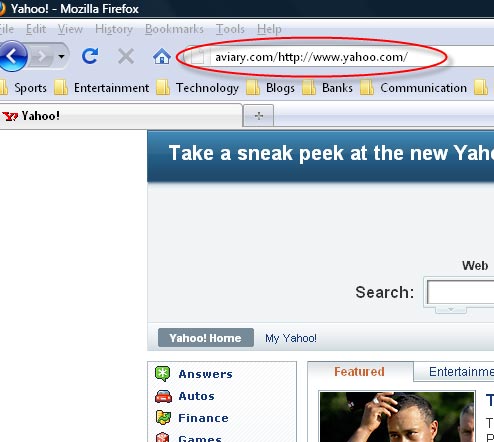
If You Find This Hard To Remember, You Can Also Go To Aviary.Com/Launch/Falcon And Enter The Url Of The Web Page That You Want To Capture.
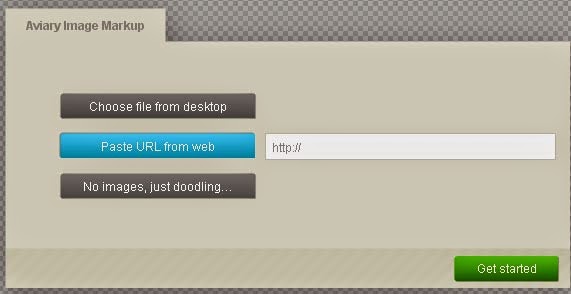
Following Either Of These Methods Would Take A Screen Capture Of The Web Page And Open It In An Online Image Editor. If You Want To Capture Only A Certain Part Of A Web Page, You Can Crop The Image Once It Has Been Captured.
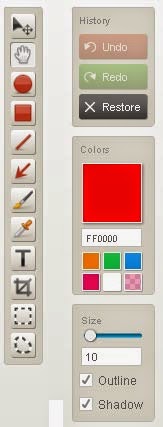
You Can Also Use The Editor To Resize, Crop, Rotate Or Flip An Image. While Resizing, You Can Simple Slide The Width Or The Height Bar To A Desired Specification. The Aspect Ratio Of The Image Would Remain Locked During Resizing So It Does Not Go Out Of Proportion. Similarly, You Can Flip The Image Vertically Or Horizontally, Or Rotate It At Any Desired Angle From 0 To 360.
If You Think You Need More Powerful Editing Tools, You Can Open The Advanced Image Editor. Features Like Adding Effects To Images And Working With A Color Palette Are Also Available Within The Image Editor. You Can Also Use The Zoom Tool To View An Enlarged Version Of The Image And Add Outlines And Shadows To The Image.
Tip: If You Simply Want To Share The Image With Somebody Without Downloading Or Uploading It Anywhere, Click On The “Save & Host Online” Button, But When It Prompts You To Register For An Account, Click “Cancel”. After This, You Will See A Small “Share This Creation” Link Which Will Provide You With A Permanent Url Of Your Image That You Can Share With Others.

Aviary Also Offers A Number Of Other On-The-Fly Image Tools That You Can Use Free Of Cost. These Include An Image Editor, A Color Editor, An Effects Editor, A Vector Editor And An Image Markup Tool. If You Regularly Use Firefox, You Can Also Access The Aviary Tools Through Their Firefox Add-On.
I Hope This Article Helps You If You Getting Any Problem Related To This Article You Can Comment By Below Comment Box We Will Help You And If You Need Any Trick Or Software Or Hack You Can Mail Us We Will Try To Give That Article We Happy To Help You All Guys.Thank You Share And Subscribe Us. #Pankaj Patidar Rock

Motivated By A Need, I Tried To Find A Way To Solve This Problem And Found Aviary.Com. Here’S How It Works:
1. Taking ScreenShots:
No Matter Which Browser You Are Using, Simply Go To The Address Bar And Add Aviary.Com/ Before The Web Page You Are Trying To Capture. So If You Want To Take A Screenshot Of Yahoo.Com You Will Type Aviary.Com/Http://Yahoo.Com In Your Address Bar.Following Either Of These Methods Would Take A Screen Capture Of The Web Page And Open It In An Online Image Editor. If You Want To Capture Only A Certain Part Of A Web Page, You Can Crop The Image Once It Has Been Captured.
2. Editing ScreenShots:
Aviary Is Also An Online Image Editor Providing Almost All Standard Features That You Can Find In A Regular Image Editing Tool. You Can Draw Shapes And Lines, Add Text And Arrows And Use Brushes.You Can Also Use The Editor To Resize, Crop, Rotate Or Flip An Image. While Resizing, You Can Simple Slide The Width Or The Height Bar To A Desired Specification. The Aspect Ratio Of The Image Would Remain Locked During Resizing So It Does Not Go Out Of Proportion. Similarly, You Can Flip The Image Vertically Or Horizontally, Or Rotate It At Any Desired Angle From 0 To 360.
If You Think You Need More Powerful Editing Tools, You Can Open The Advanced Image Editor. Features Like Adding Effects To Images And Working With A Color Palette Are Also Available Within The Image Editor. You Can Also Use The Zoom Tool To View An Enlarged Version Of The Image And Add Outlines And Shadows To The Image.
Saving Images:
Once You Are Done Editing, Just Click On The “Save To Desktop” Button To Save The Images On Your Local Drive. Alternatively, You Can Sign Up For A Free Account And Host Your Images Online Free Of Cost.Tip: If You Simply Want To Share The Image With Somebody Without Downloading Or Uploading It Anywhere, Click On The “Save & Host Online” Button, But When It Prompts You To Register For An Account, Click “Cancel”. After This, You Will See A Small “Share This Creation” Link Which Will Provide You With A Permanent Url Of Your Image That You Can Share With Others.
Aviary Also Offers A Number Of Other On-The-Fly Image Tools That You Can Use Free Of Cost. These Include An Image Editor, A Color Editor, An Effects Editor, A Vector Editor And An Image Markup Tool. If You Regularly Use Firefox, You Can Also Access The Aviary Tools Through Their Firefox Add-On.
I Hope This Article Helps You If You Getting Any Problem Related To This Article You Can Comment By Below Comment Box We Will Help You And If You Need Any Trick Or Software Or Hack You Can Mail Us We Will Try To Give That Article We Happy To Help You All Guys.Thank You Share And Subscribe Us. #Pankaj Patidar Rock
Dont Forget To Like And Follow..
Available link for download
Thursday, December 1, 2016
Glarysoft Malware Hunter PRO 1 15 0 29 Multilingual Full Patch
Glarysoft Malware Hunter PRO 1 15 0 29 Multilingual Full Patch

Malware Hunter adalah produk pemenang penghargaan yang menyediakan perlindungan yang komprehensif terhadap semua jenis ancaman, mengamankan data Anda, melindungi privasi Anda dan memastikan PC Anda bebas dari virus.
anda dapat mendownload software ini secara gratis dengan mendownload melalui link di bawah ini, didalam rar tersebut terdapat keygen, crack, patch atau serial atau sejenis-nya yang berguna untuk anda aktivasi agar software tersebut menjadi full version, dengan begitu anda dapat merasakan fitur2 dari software tersebut secara gratis.
Malware Hunter
- Hyper scan makes you enjoy a faster scanning speed.
- Detect and remove stubborn malware, against potential danger.
- Malware Hunter is an award-winning product that provides comprehensive protection against all types of threats, secures your data, protects your privacy and ensures your PC remains virus-free.
HOMEPAGE
www.glarysoft.com
DOWNLOAD LINK
SIZE : 12.0 MB
VIA UPLOADS
Glarysoft Malware Hunter PRO 1.15.0.29 Multilingual Full Patch
VIA USRSCLOUD
Glarysoft Malware Hunter PRO 1.15.0.29 Multilingual Full Patch
Available link for download
Get the HTC One M8 for Windows contract free for 20 off through January 2
Get the HTC One M8 for Windows contract free for 20 off through January 2

If youre looking to get an HTC One M8 for Windows without a contract, now would be a good time to do so. As part of their latest "Hot Deal" HTC is offering all of their devices for 20% off, including the One M8 for Windows on AT&T, T-Mobile, or Verizon. That brings the price of the device down from $650 to $520 without a contract.
The discount is available through January 2, 2015. Each customer is limited to one device, and must use the coupon HTCHOLIDAY20 at checkout in order for their purchase to qualify for this pricing.
Note: these phones are only contract-free, and not SIM-unlocked.
Dont forget to put your comments here.
Available link for download
Subscribe to:
Posts (Atom)