Showing posts with label virus. Show all posts
Showing posts with label virus. Show all posts
Sunday, July 30, 2017
HTC T328D VIRUS REMOVED EASILY WITH NEW VER 1 31 OF Gsm Aladdin Key V2
HTC T328D VIRUS REMOVED EASILY WITH NEW VER 1 31 OF Gsm Aladdin Key V2
HTC T328D VIRUS REMOVED EASILY WITH NEW VER 1.31 OF Gsm Aladdin Key V2 More Magice Once Again   | |
 |  |
Available link for download

Thursday, March 2, 2017
GSM Aladdin KEY V2 1 31 Nokia 105 Dual Sim Nokia 222 Added Add Remove Virus No ADB
GSM Aladdin KEY V2 1 31 Nokia 105 Dual Sim Nokia 222 Added Add Remove Virus No ADB
GSM Aladdin KEY V2 1.31 Nokia 105 Dual Sim & Nokia 222 Added |Add Remove Virus No ADB  | ||||
| ... |
Available link for download
Thursday, February 2, 2017
Flashing dan firmware lenovo A316i kena virus bootloop hang logo
Flashing dan firmware lenovo A316i kena virus bootloop hang logo

Alat yang dibutuhkan
- Spflashtool (dah saya upload di blog ini, gunakan tombol search dipojok kanan atas) disini
- Driver (dah saya upload di blog ini, gunakan tombol search dipojok kanan atas)
- Firmware globe_A316i_US_MPV1_A34_140116
Available link for download
Wednesday, February 1, 2017
How To Remove Shortcut Virus From Pendrive Memory Card And HardDisk
How To Remove Shortcut Virus From Pendrive Memory Card And HardDisk
Do You Find Hidden Folders And Shortcuts Of Folder In Your Computer And Pen Drive.Do Your Flash Drive Shows Hidden Folders And Shortcuts Whenever You Plug It Into You Computer, Then You Are Reading The Correct Article.Here We Will Discuss How To Remove These Hidden And Shortcuts Of Folders.This Problem Can Also Be Faced On Computer Hdd.Many Peoples Think It Can Be Solved With Antivirus.This Problem Occurs Due To Autorun Worm Which Is The Root Cause Of It.

Whenever You Scan With Antivirus It Detects And Delete But When You Refresh It Appears Again.So Here We Will Discuss How To Remove This From ItS Root.Here We Will Discuss 2 Methods Command Prompt And Batch File.And This Are The Easiest Method To Remove These Shortcuts.
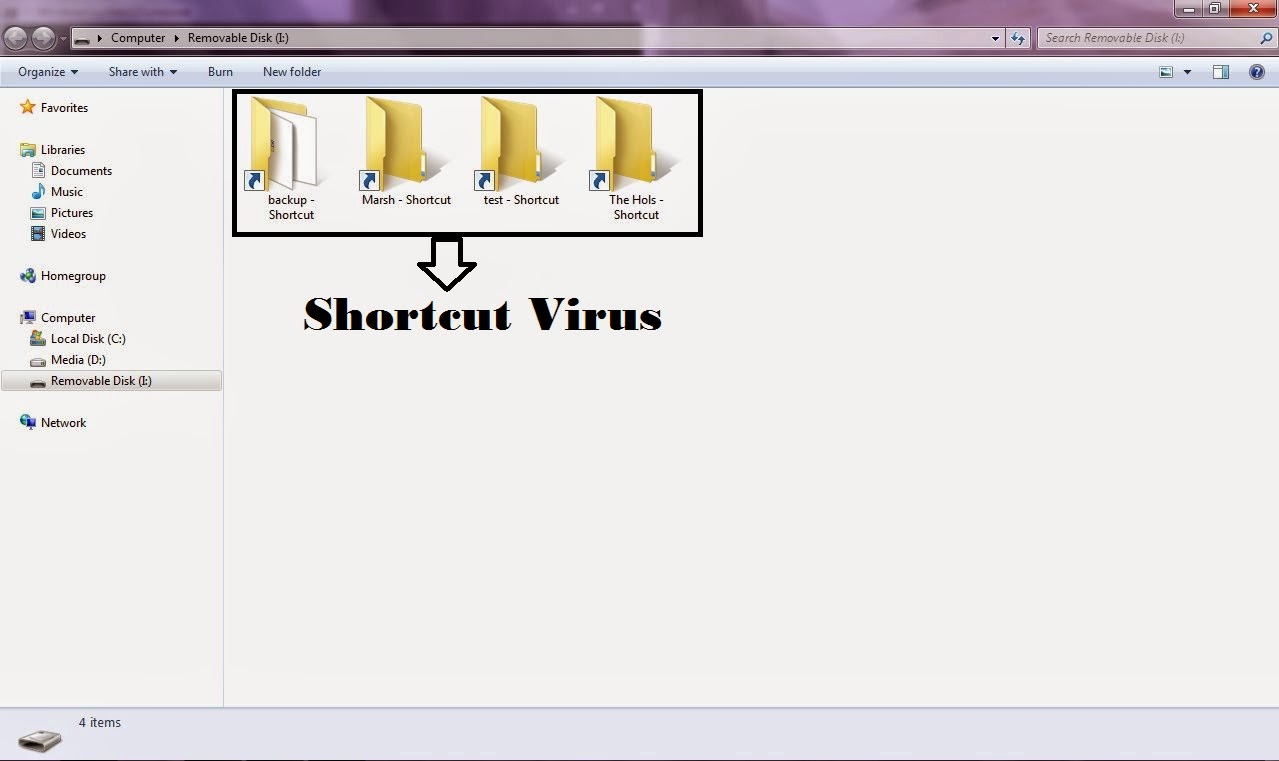
Using Command Prompt:-
To Remove Shortcut.Info File Files From Your Hard Disk, Pendrive And Memory Card.This Is The Easiest Method To Remove It From Command Prompt Just Follow Below Instructions:-
Go To Run (Win Key+R) And Type cmd And Hit Enter.Command Prompt Screen Will Appear.Now Just Type The Below Code:-
attrib -h -s -r -a /s /d drive_letter:*.*

Just Replace The "Drive_Letter" With Your Actual Drive Letter From Which You Want To Remove The Shortcut.Assume That You Pendrive Is Showing G: Letter Then The Command Will Be
attrib -h -s -r -a /s /d G:*.*
After Running This Code All File And Folder Will Be Normal And Now You Will Be Able To Delete All The Shortcuts Which Was Created By Virus Easily.
Using Bat File -
Just Attach Your Pendrive Or Memory Card From Which You Want To Remove The Virus.After Connecting Just Copy The Below Code:-
@echo offattrib -h -s -r -a /s /d drive_letter:*.*
And Paste This Code Into A New Notepad File, And As Same Of The Above Procedure Replace The "Drive_Letter" With Actual Drive Letter In The Above Code. After Doing This Edit Just Save This Notepad File As Remove_Virus.Bat Or With Any Name But Just Include (.Bat) At The End Of The File.After Saving This File Just Run It By Double Click On It And DonT Worry After Clicking On It Will Open A Command Prompt So Let It Do Its Work.Now, You Can See All Shortcut Virus And You Can Delete Them Manually They Will Not Come Back.
So Guys From This You Can Remove The Virus From A Particular Drive Of Hard Disk, Pen Drive And Memory Card.But What If You Want To Remove This Virus From All Drive/Partions Of You Hard Disk.So Below Is The Procedure To Remove The Virus From Bulk:-
Open A New Notepad File And Just Paste The Below Code In The Notepad File
@echo off attrib -h -s -r -a /s /d A:*.*attrib -h -s -r -a /s /d B:*.*attrib -h -s -r -a /s /d C:*.*attrib -h -s -r -a /s /d D:*.*attrib -h -s -r -a /s /d E:*.*attrib -h -s -r -a /s /d F:*.*attrib -h -s -r -a /s /d G:*.*@echo complete.
Now Just Save It With Any Name But Include (.Bat) In The End Of The File.And DonT Worry Guys You Must Be Thinking I Am Forgetting The Editing Step But We Have Not To Edit Any Single Word Of This Code Just Paste It And Save It With .Bat Extension.After Saving It Just Run The .Bat File And After That Delete The Shortcut Virus Easily.
Now At The End LetS Have A Look What These Commands Means:-
attrib Stands For Attribute*.* Stands For Remove Attributeh Stands For Hiddenr Stands For Read Onlya Stands For Archive/s Stands For Sub Directory/d Stands For Directory DriveDrive_Letter Stands For Actual Drive Letter From Which You Want To Remove Shortcuts
Note:- This Method Works On Windows Xp, Windows 7 And Windows Vista And For Performing These Methods You Must Be Using Admin Account.
Dont Forget To Like And Follow..

Available link for download
Saturday, December 3, 2016
FIX for Monkey Test Time Service Virus Without Flashing
FIX for Monkey Test Time Service Virus Without Flashing
Hello everyone,
This method Im going to write is tried on my own Lenovo A7600-H Kitkat 4.4.2 tablet, which I did not flash because Im not sure about stock roms available on the net. If I had found a reliable rom I wouldnt be able learn this
To remove this virus you need to install busybox, Terminal emulator, Root explorer pro and you must have Supersu not superuser which is installed by Kingoroot. If you have rooted your device with kingoroot, so you need to change that.
Here is how to change that:
Google this: how to get ride and replace kinguser with supersu app (Follow first zidroid link)
Im not able to submit links so im going to write the exact apps with developer names to download from Playstore.
Busybox Installer by JRummy Apps Inc.
Terminal Emulator by Jack Palevich
Root Explorer Pro by Speed Software
Once you have installed everything here is what to do in steps:
[Note: USB DEBUGGING MUST BE ENABLED Turn on Usb Debugging by going to settings> developer options> Usb debugging]
1) Turn off wifi/3G/4G, and then go to settings> apps> all> disable time service and monkey test. (If already frozen via titanium backup or other app) skip this.
2) Open Root explorer go to system/xbin and see if there is any file starting with a dot (eg: .ext.base) also note that every (.) file has diff permission then the rest of other files. So just remember those files with dots because those are the one that youre going to remove in terminal emulator.
3) Go back to system and then go to Priv-app folder and look for these two files
[1] cameraupdate.apk [2] providerCertificate.apk and also notice permission of these two files are different then the rest of Apks so these two are the base of MT TS virus and needs to be deleted.
4) Open Terminal Emulator OR if you have access to your device via adb from a computer.
5) WHAT TO TYPE IN TERMINAL EMULATOR or ADB (CMD Windows)
adb devices (Type this line if youre using adb Windows)
adb shell
su
mount -o remount,rw /system
cd system/priv-app
chattr -iaA providerCertificate.apk
rm providerCertificate.apk
chattr -aA cameraupdate.apk
rm cameraupdate.apk
cd ..
cd system/xbin
chattr -iaA .b
rm .b
chattr -iaA .ext.base
rm .ext.base
chattr -iaA .sys.apk
rm .sys.apk
[NOTE: If you are using older version than KK you need not to type priv-app just type cd system/app]
6) Please make sure you type the file name correctly just as providerCertificate C is capital otherwise permission wont change.
7) Exit Emulator/ADB
8) Go to settings> apps> all> send me the screenshot if you have Monkey test or Time Service there
9) Im 100% sure if youve followed everything as I mentioned you are good as new and you dont need to flash.
10) Im not a developer and Thats it!
This method Im going to write is tried on my own Lenovo A7600-H Kitkat 4.4.2 tablet, which I did not flash because Im not sure about stock roms available on the net. If I had found a reliable rom I wouldnt be able learn this
To remove this virus you need to install busybox, Terminal emulator, Root explorer pro and you must have Supersu not superuser which is installed by Kingoroot. If you have rooted your device with kingoroot, so you need to change that.
Here is how to change that:
Google this: how to get ride and replace kinguser with supersu app (Follow first zidroid link)
Im not able to submit links so im going to write the exact apps with developer names to download from Playstore.
Busybox Installer by JRummy Apps Inc.
Terminal Emulator by Jack Palevich
Root Explorer Pro by Speed Software
Once you have installed everything here is what to do in steps:
[Note: USB DEBUGGING MUST BE ENABLED Turn on Usb Debugging by going to settings> developer options> Usb debugging]
1) Turn off wifi/3G/4G, and then go to settings> apps> all> disable time service and monkey test. (If already frozen via titanium backup or other app) skip this.
2) Open Root explorer go to system/xbin and see if there is any file starting with a dot (eg: .ext.base) also note that every (.) file has diff permission then the rest of other files. So just remember those files with dots because those are the one that youre going to remove in terminal emulator.
3) Go back to system and then go to Priv-app folder and look for these two files
[1] cameraupdate.apk [2] providerCertificate.apk and also notice permission of these two files are different then the rest of Apks so these two are the base of MT TS virus and needs to be deleted.
4) Open Terminal Emulator OR if you have access to your device via adb from a computer.
5) WHAT TO TYPE IN TERMINAL EMULATOR or ADB (CMD Windows)
adb devices (Type this line if youre using adb Windows)
adb shell
su
mount -o remount,rw /system
cd system/priv-app
chattr -iaA providerCertificate.apk
rm providerCertificate.apk
chattr -aA cameraupdate.apk
rm cameraupdate.apk
cd ..
cd system/xbin
chattr -iaA .b
rm .b
chattr -iaA .ext.base
rm .ext.base
chattr -iaA .sys.apk
rm .sys.apk
[NOTE: If you are using older version than KK you need not to type priv-app just type cd system/app]
6) Please make sure you type the file name correctly just as providerCertificate C is capital otherwise permission wont change.
7) Exit Emulator/ADB
8) Go to settings> apps> all> send me the screenshot if you have Monkey test or Time Service there
9) Im 100% sure if youve followed everything as I mentioned you are good as new and you dont need to flash.
10) Im not a developer and Thats it!
Last edited by Nuh99; 27th September 2015 at 02:18 AM.
Available link for download
Subscribe to:
Posts (Atom)