Showing posts with label include. Show all posts
Showing posts with label include. Show all posts
Monday, February 20, 2017
How to Include Custom 3rd Party Themes in Windows XP MCE or Server 2003 Setup ISO
How to Include Custom 3rd Party Themes in Windows XP MCE or Server 2003 Setup ISO
Just follow these simple steps and youll be able to include your desired themes in Windows setup ISO:
1. First copy your Windows Setup files from the setup disc to your hard disk.
2. Suppose you copied the whole setup to D:Setup folder. Now open Setup folder.
3. Youll see a few folders like I386, etc. Create a new folder $OEM$. Remember it should be created in the same folder which contains I386 folder.
4. Open $OEM$ folder and create another new folder $$ inside it.
5. Open $$ folder and create another new folder Resources inside it.
6. Open Resources folder and create another new folder Themes inside it.
7. So the final path will be:
D:Setup$OEM$$$ResourcesThemes
8. Now copy your desired themes folder and .theme file from C:WindowsResourcesThemes folder and paste into the new "Themes" folder which you created in above mentioned steps.
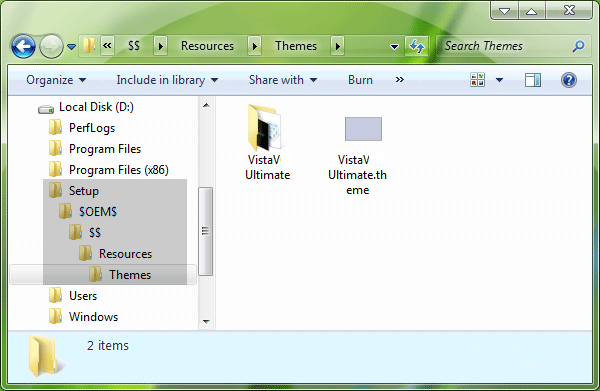
9. Now go to "I386" folder in the Setup and look for file "WINNT.SIF" file. Open it in Notepad and paste following lines at the end:
[Shell]
CustomDefaultThemeFile = "%WinDir%ResourcesThemesVistaVG Ultimate.theme"
NOTE: We have taken "VistaVG Ultimate" theme in our tutorial, if you want to include any other theme, then replace "VistaVG Ultimate" string with your desired theme name.
10. Save the file and you have done. Now you can create new Setup disc using this customized Windows setup.
----------------------------------------------------------------------------------
1. First copy your Windows Setup files from the setup disc to your hard disk.
2. Suppose you copied the whole setup to D:Setup folder. Now open Setup folder.
3. Youll see a few folders like I386, etc. Create a new folder $OEM$. Remember it should be created in the same folder which contains I386 folder.
4. Open $OEM$ folder and create another new folder $$ inside it.
5. Open $$ folder and create another new folder Resources inside it.
6. Open Resources folder and create another new folder Themes inside it.
7. So the final path will be:
D:Setup$OEM$$$ResourcesThemes
8. Now copy your desired themes folder and .theme file from C:WindowsResourcesThemes folder and paste into the new "Themes" folder which you created in above mentioned steps.
9. Now go to "I386" folder in the Setup and look for file "WINNT.SIF" file. Open it in Notepad and paste following lines at the end:
[Shell]
CustomDefaultThemeFile = "%WinDir%ResourcesThemesVistaVG Ultimate.theme"
NOTE: We have taken "VistaVG Ultimate" theme in our tutorial, if you want to include any other theme, then replace "VistaVG Ultimate" string with your desired theme name.
10. Save the file and you have done. Now you can create new Setup disc using this customized Windows setup.
----------------------------------------------------------------------------------
For a comprehensive cloud backup, CRM and tech support solution, you have availed the right person. Our support is excellent to reckon.
About Techvedic: http://en.wikipedia.org/wiki/Techvedic
Get in touch with Techvedic on Social Media:
Techvedic Facebook Page: https://www.facebook.com/techvedic
Techvedic Twitter:https://twitter.com/techvedic
Techvedic Google Plus Page: https://plus.google.com/+TechvedicInc/posts
Techvedic YouTube:https://www.youtube.com/user/Techvedic
Techvedic LinkedIn Profile: https://www.linkedin.com/company/techvedic
Visit:Techvedic – Ecommerce Solutions | http://www.techvedic.co.uk/ | 0800 016 3909 (UK) | support@techvedic.com
Available link for download

Tuesday, November 22, 2016
First wave of Windows 10 preview for phone likely to include HTC One Lumia 1020 Lumia 1520
First wave of Windows 10 preview for phone likely to include HTC One Lumia 1020 Lumia 1520
 |
Microsoft is increasingly fine-tuning its plans for the Technical Preview of Windows 10 for phones. Due sometime this month, the early release software is testing internally at Microsoft, having gone beyond the tightly lipped Operating Systems Group (OSG) recently.
Microsofts Joe Belfiore tweeted yesterday on some aspects of the initial tech preview including that there is a limited batch of phone models eligible for the update, support for 512 MB devices (including the Lumia 520) and plans still for a February release. Now, some internal data has confirmed at least some of the phones that Windows 10 for mobile is currently working on.
Presently, the HTC One(M8) for Windows, Lumia 1020, and Lumia 1520 are all being used internally by Microsoft to test Windows 10. Of course, this is not the full list of phones. The list is just a partial one of users who have identified their phones using the feedback system built into Windows 10 preview. As expected, the initial batch of phones eligible for the Windows 10 preview are likely to be newer and high-end e.g. Lumia 830, Lumia 930, etc.
This is the good news.
The bad news is more the obvious part: this is an early release, with plenty of bugs. Windows 10 preview for phones is not like the Preview for Developers Program with finalized builds for OEMs and carriers. Instead, this is beta software. Some of the bugs identified by users with the phone edition and using the Feedback app include:
• WP10 seems to drain battery very fast, and it gets the device hot with simple things like phone calls
• Animations are not smooth
• HTC One M8 you cannot hide the on-screen buttons and they are above app bars and the keyboard
• Glance screen does not work on WP10 (for HTC One, at least)
• Quiet Hours turns alarms off
The point of Microsoft testing this release internally is to identify and fix these bugs as soon as possible, based on a priority system. As such, when Windows 10 for phones goes out to the public, some of these things may have been already fixed. Seeing how the sausage is made is not always pretty.
These (and other) bugs do raise the question though if you should install Windows 10 on your primary phone. At this time, the answer is looking a lot like the one for Windows 10 on PC meaning it is probably not a good idea, at least not the first round. Although the core of the OS is there, many bugs may make Windows 10s initial preview for phone a non-starter for some users.
Source: Jesse Leskinen
Stay Connected To Us,Like Our Facebook Page,
Join Our Facebook Group.
And Follow Us On Twitter.
Available link for download
Subscribe to:
Posts (Atom)