Showing posts with label manager. Show all posts
Showing posts with label manager. Show all posts
Friday, March 17, 2017
File Manager source code
File Manager source code
namespace File_Explorer
{
using GoogleAds;
using Microsoft.Phone.Controls;
using Microsoft.Phone.Shell;
using Microsoft.Phone.Tasks;
using SharpCompress.Archive;
using SharpCompress.Archive.Zip;
using SharpCompress.Common;
using SharpCompress.Compressor.Deflate;
using System;
using System.Collections.Generic;
using System.Collections.ObjectModel;
using System.ComponentModel;
using System.Diagnostics;
using System.IO;
using System.IO.IsolatedStorage;
using System.Linq;
using System.Runtime.CompilerServices;
using System.Runtime.InteropServices;
using System.Runtime.InteropServices.WindowsRuntime;
using System.Threading.Tasks;
using System.Windows;
using System.Windows.Controls;
using System.Windows.Input;
using System.Windows.Media;
using System.Windows.Media.Animation;
using System.Windows.Media.Imaging;
using System.Windows.Navigation;
using System.Windows.Threading;
using Windows.ApplicationModel.DataTransfer;
using Windows.Foundation;
using Windows.Storage;
using Windows.System;
public class MainPage : PhoneApplicationPage
{
private bool _contentLoaded;
private MarketplaceDetailTask _marketPlaceDetailTask = new MarketplaceDetailTask();
private bool AdLoaded;
internal Grid AdRoot;
private ApplicationBarIconButton appbarcopy;
private ApplicationBarIconButton appbarcut;
private ApplicationBarIconButton appbarsearch;
private ApplicationBarIconButton appbarshare;
private bool cancel;
internal Grid ContentPanel;
private string CurrentPath = "";
private ApplicationBarIconButton delete;
internal TextBlock emptyFolder;
internal LongListSelector explorer;
internal Storyboard HideOperationBox;
internal Storyboard HideOperationDetails;
private bool IsBusy;
private bool IsOpen;
private bool IsSearchEnabled;
private int itemsRemaining;
internal Grid LayoutRoot;
internal Button Navigate_Button;
private File_Explorer.NavigationType NavigationMode;
private string NextPath = "";
internal Button Operation_Cancel;
internal TextBlock Operation_Left;
internal TextBlock Operation_Name;
internal TextBlock Operation_Status;
internal TextBlock Operation_Title;
internal Grid OperationBox;
internal StackPanel OperationDetails;
private ApplicationBarMenuItem paste;
internal Grid pathBackground;
internal ScrollViewer pathScrollViewer;
internal TextBox PathText;
private string phonePath = @"C:DataUsersPublic";
internal ProgressBar Progress;
private string SearchText;
internal ProgressBar secondaryProgress;
private ApplicationBarIconButton select;
private ApplicationBarMenuItem selectall;
private File_Explorer.StorageItem selectedItem;
internal Storyboard ShowOperationBox;
internal Storyboard ShowOperationDetails;
internal Storyboard storyboard;
internal StackPanel TitlePanel;
internal TranslateTransform transform;
internal Button UpDown;
public MainPage()
{
ApplicationBarIconButton button = new ApplicationBarIconButton(new Uri(@"AssetsApplicationBar.Select.png", UriKind.Relative));
button.set_Text("select");
this.select = button;
ApplicationBarIconButton button2 = new ApplicationBarIconButton(new Uri(@"AssetsApplicationBar.Delete.png", UriKind.Relative));
button2.set_Text("delete");
this.delete = button2;
ApplicationBarIconButton button3 = new ApplicationBarIconButton(new Uri(@"AssetsCopy.png", UriKind.Relative));
button3.set_Text("copy");
this.appbarcopy = button3;
ApplicationBarIconButton button4 = new ApplicationBarIconButton(new Uri(@"AssetsCut.png", UriKind.Relative));
button4.set_Text("cut");
this.appbarcut = button4;
ApplicationBarIconButton button5 = new ApplicationBarIconButton(new Uri(@"Assetsfeature.search.png", UriKind.Relative));
button5.set_Text("search");
this.appbarsearch = button5;
ApplicationBarIconButton button6 = new ApplicationBarIconButton(new Uri(@"AssetsApplicationBar.Share.png", UriKind.Relative));
button6.set_Text("share");
this.appbarshare = button6;
ApplicationBarMenuItem item = new ApplicationBarMenuItem("Paste");
item.set_IsEnabled(false);
this.paste = item;
this.selectall = new ApplicationBarMenuItem("Select all");
this.SearchText = "";
this.InitializeComponent();
this.explorer.set_LayoutMode((File_Explorer.App.ViewModel.ViewMode == 0) ? ((LongListSelectorLayoutMode) 0) : ((LongListSelectorLayoutMode) 1));
this.explorer.set_ItemTemplate((DataTemplate) base.get_Resources().get_Item((File_Explorer.App.ViewModel.ViewMode == 0) ? "ListTemplate" : "GridTemplate"));
base.set_DataContext(File_Explorer.App.ViewModel);
this.Init();
this.BuildLocalizedApplicationBar();
File_Explorer.FileOperator.ProgressChanged += new EventHandler<File_Explorer.FileOperationProgressChangedEventArgs>(this.FileOperator_ProgressChanged);
}
private async void AddItem(string path, bool IsFolder)
{
Func<File_Explorer.StorageItem, bool> predicate = null;
Func<File_Explorer.StorageItem, bool> asyncVariable5 = null;
if (this.PathEquals(Path.GetDirectoryName(path), this.CurrentPath) && !this.cancel)
{
if (IsFolder)
{
try
{
File_Explorer.StorageItem expressionStack_2FD_0;
ObservableCollection<File_Explorer.StorageItem> expressionStack_2FD_1;
File_Explorer.StorageItem expressionStack_22D_0;
ObservableCollection<File_Explorer.StorageItem> expressionStack_22D_1;
File_Explorer.StorageItem expressionStack_212_0;
ObservableCollection<File_Explorer.StorageItem> expressionStack_212_1;
ObservableCollection<File_Explorer.StorageItem> storageSource;
File_Explorer.StorageItem expressionStack_269_0;
ObservableCollection<File_Explorer.StorageItem> expressionStack_269_1;
File_Explorer.StorageItem expressionStack_263_0;
ObservableCollection<File_Explorer.StorageItem> expressionStack_263_1;
File_Explorer.StorageItem expressionStack_289_0;
ObservableCollection<File_Explorer.StorageItem> expressionStack_289_1;
ObservableCollection<File_Explorer.StorageItem> expressionStack_E5_0;
if (this.cancel)
{
return;
}
if (predicate != null)
{
storageSource = File_Explorer.App.ViewModel.StorageSource;
break;
}
else
{
expressionStack_E5_0 = File_Explorer.App.ViewModel.StorageSource;
}
predicate = x => x.IsFolder && this.PathEquals(x.Path, path);
storageSource = expressionStack_E5_0;
if (storageSource.SingleOrDefault<File_Explorer.StorageItem>(predicate) != null)
{
return;
}
StorageFolder asyncVariable0 = await StorageFolder.GetFolderFromPathAsync(path);
File_Explorer.StorageItem item = new File_Explorer.StorageItem {
FileName = asyncVariable0.get_Name(),
IsFolder = true,
Path = asyncVariable0.get_Path(),
Description = asyncVariable0.get_DateCreated().ToString()
};
if (this.explorer.get_LayoutMode() == null)
{
expressionStack_22D_1 = File_Explorer.App.ViewModel.StorageSource;
expressionStack_22D_0 = item;
goto Label_022D;
}
else
{
expressionStack_212_1 = File_Explorer.App.ViewModel.StorageSource;
expressionStack_212_0 = item;
}
ObservableCollection<File_Explorer.StorageItem> expressionStack_246_2 = expressionStack_212_1;
File_Explorer.StorageItem expressionStack_246_1 = expressionStack_212_0;
Style expressionStack_246_0 = (Style) Application.get_Current().get_Resources().get_Item("Folder");
goto Label_0246;
Label_022D:
expressionStack_246_2 = expressionStack_22D_1;
expressionStack_246_1 = expressionStack_22D_0;
expressionStack_246_0 = (Style) Application.get_Current().get_Resources().get_Item("File");
Label_0246:
expressionStack_246_1.Style = expressionStack_246_0;
if (this.explorer.get_LayoutMode() == null)
{
expressionStack_269_1 = expressionStack_246_2;
expressionStack_269_0 = item;
goto Label_0269;
}
else
{
expressionStack_263_1 = expressionStack_246_2;
expressionStack_263_0 = item;
}
ObservableCollection<File_Explorer.StorageItem> expressionStack_311_2 = expressionStack_263_1;
File_Explorer.StorageItem expressionStack_311_1 = expressionStack_263_0;
BitmapImage expressionStack_311_0 = null;
goto Label_0311;
Label_0269:
if (awaiter3.IsCompleted)
{
expressionStack_2FD_1 = expressionStack_269_1;
expressionStack_2FD_0 = expressionStack_269_0;
goto Label_02FD;
}
else
{
expressionStack_289_1 = expressionStack_269_1;
expressionStack_289_0 = expressionStack_269_0;
}
Tuple<ObservableCollection<File_Explorer.StorageItem>, File_Explorer.StorageItem> tuple = new Tuple<ObservableCollection<File_Explorer.StorageItem>, File_Explorer.StorageItem>(expressionStack_289_1, expressionStack_289_0);
this.<>t__stack = tuple;
this.<>1__state = 1;
AsyncVoidMethodBuilder.Create().AwaitUnsafeOnCompleted<TaskAwaiter<ImageSource>, <AddItem>d__d8>(ref awaiter3, ref this);
return;
Tuple<ObservableCollection<File_Explorer.StorageItem>, File_Explorer.StorageItem> tuple2 = (Tuple<ObservableCollection<File_Explorer.StorageItem>, File_Explorer.StorageItem>) this.<>t__stack;
this.<>t__stack = null;
expressionStack_2FD_1 = tuple2.Item1;
expressionStack_2FD_0 = tuple2.Item2;
Label_02FD:
ImageSource introduced36 = await GetIcon("Folder", "", null);
expressionStack_311_2 = expressionStack_2FD_1;
expressionStack_311_1 = expressionStack_2FD_0;
expressionStack_311_0 = (BitmapImage) introduced36;
Label_0311:
expressionStack_311_1.ThumbSource = expressionStack_311_0;
expressionStack_311_2.Add(item);
}
catch
{
}
}
else
{
try
{
StorageFile asyncVariable2;
string subdesc;
string extension;
File_Explorer.StorageItem asyncVariable3;
string expressionStack_6A2_0;
File_Explorer.StorageItem expressionStack_7EB_0;
ObservableCollection<File_Explorer.StorageItem> expressionStack_7EB_1;
if (!this.cancel)
{
ObservableCollection<File_Explorer.StorageItem> expressionStack_38A_0;
string expressionStack_63F_0;
ObservableCollection<File_Explorer.StorageItem> expressionStack_373_0;
if (asyncVariable5 != null)
{
expressionStack_38A_0 = File_Explorer.App.ViewModel.StorageSource;
break;
}
else
{
expressionStack_373_0 = File_Explorer.App.ViewModel.StorageSource;
}
asyncVariable5 = x => !x.IsFolder && this.PathEquals(x.Path, path);
expressionStack_38A_0 = expressionStack_373_0;
if (expressionStack_38A_0.SingleOrDefault<File_Explorer.StorageItem>(asyncVariable5) != null)
{
return;
}
asyncVariable2 = await StorageFile.GetFileFromPathAsync(path);
subdesc = "";
extension = Path.GetExtension(asyncVariable2.get_Name()).ToLower();
if ((((extension == ".mp4") || (extension == ".wav")) || ((extension == ".mpg") || (extension == ".mp3"))) || ((extension == ".wma") || (extension == ".wmv")))
{
StorageFile introduced39 = await StorageFile.GetFileFromPathAsync(asyncVariable2.get_Path());
MusicProperties introduced40 = await introduced39.get_Properties().GetMusicPropertiesAsync();
TimeSpan duration = introduced40.get_Duration();
subdesc = "Duration: " + duration.Hours.ToString("00") + ":" + duration.Minutes.ToString("00") + ":" + duration.Seconds.ToString("00");
}
if (awaiter11.IsCompleted)
{
expressionStack_6A2_0 = "Size: ";
goto Label_06A2;
}
else
{
expressionStack_63F_0 = "Size: ";
}
string str = expressionStack_63F_0;
this.<>t__stack = str;
this.<>1__state = 5;
AsyncVoidMethodBuilder.Create().AwaitUnsafeOnCompleted<TaskAwaiter<BasicProperties>, <AddItem>d__d8>(ref awaiter11, ref this);
}
return;
string str2 = (string) this.<>t__stack;
this.<>t__stack = null;
expressionStack_6A2_0 = str2;
Label_06A2:
BasicProperties introduced41 = await asyncVariable2.GetBasicPropertiesAsync();
string filesize = expressionStack_6A2_0 + FormatBytes((double) introduced41.get_Size());
if (!this.cancel)
{
File_Explorer.StorageItem expressionStack_777_0;
ObservableCollection<File_Explorer.StorageItem> expressionStack_777_1;
asyncVariable3 = new File_Explorer.StorageItem {
FileName = asyncVariable2.get_Name(),
&n
Read more »
{
using GoogleAds;
using Microsoft.Phone.Controls;
using Microsoft.Phone.Shell;
using Microsoft.Phone.Tasks;
using SharpCompress.Archive;
using SharpCompress.Archive.Zip;
using SharpCompress.Common;
using SharpCompress.Compressor.Deflate;
using System;
using System.Collections.Generic;
using System.Collections.ObjectModel;
using System.ComponentModel;
using System.Diagnostics;
using System.IO;
using System.IO.IsolatedStorage;
using System.Linq;
using System.Runtime.CompilerServices;
using System.Runtime.InteropServices;
using System.Runtime.InteropServices.WindowsRuntime;
using System.Threading.Tasks;
using System.Windows;
using System.Windows.Controls;
using System.Windows.Input;
using System.Windows.Media;
using System.Windows.Media.Animation;
using System.Windows.Media.Imaging;
using System.Windows.Navigation;
using System.Windows.Threading;
using Windows.ApplicationModel.DataTransfer;
using Windows.Foundation;
using Windows.Storage;
using Windows.System;
public class MainPage : PhoneApplicationPage
{
private bool _contentLoaded;
private MarketplaceDetailTask _marketPlaceDetailTask = new MarketplaceDetailTask();
private bool AdLoaded;
internal Grid AdRoot;
private ApplicationBarIconButton appbarcopy;
private ApplicationBarIconButton appbarcut;
private ApplicationBarIconButton appbarsearch;
private ApplicationBarIconButton appbarshare;
private bool cancel;
internal Grid ContentPanel;
private string CurrentPath = "";
private ApplicationBarIconButton delete;
internal TextBlock emptyFolder;
internal LongListSelector explorer;
internal Storyboard HideOperationBox;
internal Storyboard HideOperationDetails;
private bool IsBusy;
private bool IsOpen;
private bool IsSearchEnabled;
private int itemsRemaining;
internal Grid LayoutRoot;
internal Button Navigate_Button;
private File_Explorer.NavigationType NavigationMode;
private string NextPath = "";
internal Button Operation_Cancel;
internal TextBlock Operation_Left;
internal TextBlock Operation_Name;
internal TextBlock Operation_Status;
internal TextBlock Operation_Title;
internal Grid OperationBox;
internal StackPanel OperationDetails;
private ApplicationBarMenuItem paste;
internal Grid pathBackground;
internal ScrollViewer pathScrollViewer;
internal TextBox PathText;
private string phonePath = @"C:DataUsersPublic";
internal ProgressBar Progress;
private string SearchText;
internal ProgressBar secondaryProgress;
private ApplicationBarIconButton select;
private ApplicationBarMenuItem selectall;
private File_Explorer.StorageItem selectedItem;
internal Storyboard ShowOperationBox;
internal Storyboard ShowOperationDetails;
internal Storyboard storyboard;
internal StackPanel TitlePanel;
internal TranslateTransform transform;
internal Button UpDown;
public MainPage()
{
ApplicationBarIconButton button = new ApplicationBarIconButton(new Uri(@"AssetsApplicationBar.Select.png", UriKind.Relative));
button.set_Text("select");
this.select = button;
ApplicationBarIconButton button2 = new ApplicationBarIconButton(new Uri(@"AssetsApplicationBar.Delete.png", UriKind.Relative));
button2.set_Text("delete");
this.delete = button2;
ApplicationBarIconButton button3 = new ApplicationBarIconButton(new Uri(@"AssetsCopy.png", UriKind.Relative));
button3.set_Text("copy");
this.appbarcopy = button3;
ApplicationBarIconButton button4 = new ApplicationBarIconButton(new Uri(@"AssetsCut.png", UriKind.Relative));
button4.set_Text("cut");
this.appbarcut = button4;
ApplicationBarIconButton button5 = new ApplicationBarIconButton(new Uri(@"Assetsfeature.search.png", UriKind.Relative));
button5.set_Text("search");
this.appbarsearch = button5;
ApplicationBarIconButton button6 = new ApplicationBarIconButton(new Uri(@"AssetsApplicationBar.Share.png", UriKind.Relative));
button6.set_Text("share");
this.appbarshare = button6;
ApplicationBarMenuItem item = new ApplicationBarMenuItem("Paste");
item.set_IsEnabled(false);
this.paste = item;
this.selectall = new ApplicationBarMenuItem("Select all");
this.SearchText = "";
this.InitializeComponent();
this.explorer.set_LayoutMode((File_Explorer.App.ViewModel.ViewMode == 0) ? ((LongListSelectorLayoutMode) 0) : ((LongListSelectorLayoutMode) 1));
this.explorer.set_ItemTemplate((DataTemplate) base.get_Resources().get_Item((File_Explorer.App.ViewModel.ViewMode == 0) ? "ListTemplate" : "GridTemplate"));
base.set_DataContext(File_Explorer.App.ViewModel);
this.Init();
this.BuildLocalizedApplicationBar();
File_Explorer.FileOperator.ProgressChanged += new EventHandler<File_Explorer.FileOperationProgressChangedEventArgs>(this.FileOperator_ProgressChanged);
}
private async void AddItem(string path, bool IsFolder)
{
Func<File_Explorer.StorageItem, bool> predicate = null;
Func<File_Explorer.StorageItem, bool> asyncVariable5 = null;
if (this.PathEquals(Path.GetDirectoryName(path), this.CurrentPath) && !this.cancel)
{
if (IsFolder)
{
try
{
File_Explorer.StorageItem expressionStack_2FD_0;
ObservableCollection<File_Explorer.StorageItem> expressionStack_2FD_1;
File_Explorer.StorageItem expressionStack_22D_0;
ObservableCollection<File_Explorer.StorageItem> expressionStack_22D_1;
File_Explorer.StorageItem expressionStack_212_0;
ObservableCollection<File_Explorer.StorageItem> expressionStack_212_1;
ObservableCollection<File_Explorer.StorageItem> storageSource;
File_Explorer.StorageItem expressionStack_269_0;
ObservableCollection<File_Explorer.StorageItem> expressionStack_269_1;
File_Explorer.StorageItem expressionStack_263_0;
ObservableCollection<File_Explorer.StorageItem> expressionStack_263_1;
File_Explorer.StorageItem expressionStack_289_0;
ObservableCollection<File_Explorer.StorageItem> expressionStack_289_1;
ObservableCollection<File_Explorer.StorageItem> expressionStack_E5_0;
if (this.cancel)
{
return;
}
if (predicate != null)
{
storageSource = File_Explorer.App.ViewModel.StorageSource;
break;
}
else
{
expressionStack_E5_0 = File_Explorer.App.ViewModel.StorageSource;
}
predicate = x => x.IsFolder && this.PathEquals(x.Path, path);
storageSource = expressionStack_E5_0;
if (storageSource.SingleOrDefault<File_Explorer.StorageItem>(predicate) != null)
{
return;
}
StorageFolder asyncVariable0 = await StorageFolder.GetFolderFromPathAsync(path);
File_Explorer.StorageItem item = new File_Explorer.StorageItem {
FileName = asyncVariable0.get_Name(),
IsFolder = true,
Path = asyncVariable0.get_Path(),
Description = asyncVariable0.get_DateCreated().ToString()
};
if (this.explorer.get_LayoutMode() == null)
{
expressionStack_22D_1 = File_Explorer.App.ViewModel.StorageSource;
expressionStack_22D_0 = item;
goto Label_022D;
}
else
{
expressionStack_212_1 = File_Explorer.App.ViewModel.StorageSource;
expressionStack_212_0 = item;
}
ObservableCollection<File_Explorer.StorageItem> expressionStack_246_2 = expressionStack_212_1;
File_Explorer.StorageItem expressionStack_246_1 = expressionStack_212_0;
Style expressionStack_246_0 = (Style) Application.get_Current().get_Resources().get_Item("Folder");
goto Label_0246;
Label_022D:
expressionStack_246_2 = expressionStack_22D_1;
expressionStack_246_1 = expressionStack_22D_0;
expressionStack_246_0 = (Style) Application.get_Current().get_Resources().get_Item("File");
Label_0246:
expressionStack_246_1.Style = expressionStack_246_0;
if (this.explorer.get_LayoutMode() == null)
{
expressionStack_269_1 = expressionStack_246_2;
expressionStack_269_0 = item;
goto Label_0269;
}
else
{
expressionStack_263_1 = expressionStack_246_2;
expressionStack_263_0 = item;
}
ObservableCollection<File_Explorer.StorageItem> expressionStack_311_2 = expressionStack_263_1;
File_Explorer.StorageItem expressionStack_311_1 = expressionStack_263_0;
BitmapImage expressionStack_311_0 = null;
goto Label_0311;
Label_0269:
if (awaiter3.IsCompleted)
{
expressionStack_2FD_1 = expressionStack_269_1;
expressionStack_2FD_0 = expressionStack_269_0;
goto Label_02FD;
}
else
{
expressionStack_289_1 = expressionStack_269_1;
expressionStack_289_0 = expressionStack_269_0;
}
Tuple<ObservableCollection<File_Explorer.StorageItem>, File_Explorer.StorageItem> tuple = new Tuple<ObservableCollection<File_Explorer.StorageItem>, File_Explorer.StorageItem>(expressionStack_289_1, expressionStack_289_0);
this.<>t__stack = tuple;
this.<>1__state = 1;
AsyncVoidMethodBuilder.Create().AwaitUnsafeOnCompleted<TaskAwaiter<ImageSource>, <AddItem>d__d8>(ref awaiter3, ref this);
return;
Tuple<ObservableCollection<File_Explorer.StorageItem>, File_Explorer.StorageItem> tuple2 = (Tuple<ObservableCollection<File_Explorer.StorageItem>, File_Explorer.StorageItem>) this.<>t__stack;
this.<>t__stack = null;
expressionStack_2FD_1 = tuple2.Item1;
expressionStack_2FD_0 = tuple2.Item2;
Label_02FD:
ImageSource introduced36 = await GetIcon("Folder", "", null);
expressionStack_311_2 = expressionStack_2FD_1;
expressionStack_311_1 = expressionStack_2FD_0;
expressionStack_311_0 = (BitmapImage) introduced36;
Label_0311:
expressionStack_311_1.ThumbSource = expressionStack_311_0;
expressionStack_311_2.Add(item);
}
catch
{
}
}
else
{
try
{
StorageFile asyncVariable2;
string subdesc;
string extension;
File_Explorer.StorageItem asyncVariable3;
string expressionStack_6A2_0;
File_Explorer.StorageItem expressionStack_7EB_0;
ObservableCollection<File_Explorer.StorageItem> expressionStack_7EB_1;
if (!this.cancel)
{
ObservableCollection<File_Explorer.StorageItem> expressionStack_38A_0;
string expressionStack_63F_0;
ObservableCollection<File_Explorer.StorageItem> expressionStack_373_0;
if (asyncVariable5 != null)
{
expressionStack_38A_0 = File_Explorer.App.ViewModel.StorageSource;
break;
}
else
{
expressionStack_373_0 = File_Explorer.App.ViewModel.StorageSource;
}
asyncVariable5 = x => !x.IsFolder && this.PathEquals(x.Path, path);
expressionStack_38A_0 = expressionStack_373_0;
if (expressionStack_38A_0.SingleOrDefault<File_Explorer.StorageItem>(asyncVariable5) != null)
{
return;
}
asyncVariable2 = await StorageFile.GetFileFromPathAsync(path);
subdesc = "";
extension = Path.GetExtension(asyncVariable2.get_Name()).ToLower();
if ((((extension == ".mp4") || (extension == ".wav")) || ((extension == ".mpg") || (extension == ".mp3"))) || ((extension == ".wma") || (extension == ".wmv")))
{
StorageFile introduced39 = await StorageFile.GetFileFromPathAsync(asyncVariable2.get_Path());
MusicProperties introduced40 = await introduced39.get_Properties().GetMusicPropertiesAsync();
TimeSpan duration = introduced40.get_Duration();
subdesc = "Duration: " + duration.Hours.ToString("00") + ":" + duration.Minutes.ToString("00") + ":" + duration.Seconds.ToString("00");
}
if (awaiter11.IsCompleted)
{
expressionStack_6A2_0 = "Size: ";
goto Label_06A2;
}
else
{
expressionStack_63F_0 = "Size: ";
}
string str = expressionStack_63F_0;
this.<>t__stack = str;
this.<>1__state = 5;
AsyncVoidMethodBuilder.Create().AwaitUnsafeOnCompleted<TaskAwaiter<BasicProperties>, <AddItem>d__d8>(ref awaiter11, ref this);
}
return;
string str2 = (string) this.<>t__stack;
this.<>t__stack = null;
expressionStack_6A2_0 = str2;
Label_06A2:
BasicProperties introduced41 = await asyncVariable2.GetBasicPropertiesAsync();
string filesize = expressionStack_6A2_0 + FormatBytes((double) introduced41.get_Size());
if (!this.cancel)
{
File_Explorer.StorageItem expressionStack_777_0;
ObservableCollection<File_Explorer.StorageItem> expressionStack_777_1;
asyncVariable3 = new File_Explorer.StorageItem {
FileName = asyncVariable2.get_Name(),
&n
Available link for download

Friday, January 20, 2017
Internet Download Manager Optimizer 0 1
Internet Download Manager Optimizer 0 1
 |
| Internet Download Manager Optimizer 0.1 |
IDM Optimizer is a free of charge device that permits end user to adjust the connection pace along with the kind of link pertaining to Web Download Administrator. That incorporates a simple to operate along with receptive GUI that permits users to be able to quickly optimize IDM.
File Info :
- Name : Internet Download Manager Optimizer 0.1
- Publisher : Visit Webiste
- Password : No
- Size : 160.9 Kb
- Release Date : 2014-01-07
- Submit Date : 2014-05-23
- Os Support : Windows
Link Download :
======================================================================
Download Internet Download Manager Optimizer 0.1
======================================================================
Available link for download
Wednesday, January 11, 2017
Internet Download Manager 6 15 Build 9 patch
Internet Download Manager 6 15 Build 9 patch
Aslamualaikum.wr.wb
Selamat malam semuanya, pada malam hari ini saya akan membagikan tutorial cara menginstal Flashtool, kawan-kawan semua pasti sudah tahu kan apa kegunaan dari, yuup benar sekali, flashtool adalah software untuk melakukan flashing semua produk Sony Xperia, OK.. Langsung saja berikut ini cara nya, Sebelum melanjutkan ke tahap tutorial nya siapkan dulu bahan-bahan nya di bawah ini
1. PC
2. Flashtool Download Disini
Langkah Eksekusi
1. Duoble klik pada flahstool yang sudah di download tadi,lalu klik instal, (lihat gambar)

2. Setelah instalasi complete, Klik next

3. Setelah itu lanjutkan ke tahap menginstal Flashtool-driver nya, buka Local disk C/flashtool/driver/flashtool-driver

4. Lalu double klik pada flashtool-driver

5. Nanti ada pilihan driver apa saja yang akan di instal,saran saya cenntang aja semuanya, Jika ada peringantan bla bla bla, klik next aja/instal, tunggu sampai semua driver nya terinstal, ENJOY..
Semoga bermanfaat
source
Available link for download
Monday, January 2, 2017
Internet Download Manager 6 25 Build 23 Multilingual Retail Full Patch
Internet Download Manager 6 25 Build 23 Multilingual Retail Full Patch

Internet Download Manager (IDM) adalah aplikasi yang mudah digunakan dan meningkatkan kecepatan download sampai 500 persen, resume dan jadwal download mendukung. Menurut survey dari beberapa pendapat bahwa Internet Download Manager adalah sebuah program akselerator yang sempurna untuk men-download software favorit, game, cd, dvd, mp3, film, shareware dan freeware lebih cepat!

Features:
- All popular browsers and applications are supported!
- Easy downloading with one click.
- Download Speed Acceleration.
- Download Resume
- YouTube grabber.
- Simple installation wizard.
- Drag and Drop.
- Automatic Antivirus checking.
- Advanced Browser Integration.
- Built-in Scheduler.
- IDM includes web site spider and grabber.
- IDM supports many types of proxy servers.
- IDM supports main authentication protocols:
- Download All feature.
- Customizable Interface.
- Download Categories.
- Quick Update Feature.
- Download limits.
- IDM is multilingual.
<<< How to Activate! >>>
1 Unpack and Install Program.
2 After Install Dont Start/Lunch Program
3 Run patch as Administrator
4 Apply the patch.
5 Enjoy!
HOMEPAGE
www.internetdownloadmanager.com
DOWNLOAD LINK
VIA UPLOADS
IDM 6.25 Build 23 Final | 13.7 Mb
VIA USERSCLOUD
IDM 6.25 Build 23 Final | 13.7 Mb
RETAIL
IDM 6.25 Build 23 Final | 6 Mb
Available link for download
Friday, December 16, 2016
File Manager 10 For Windows phone
File Manager 10 For Windows phone
File Manager 10

*** File Manager ***
- Two Windows with adjustable size
- Open, copy, move, delete, rename
- Support for storage media
- Full integration of one drive
- Tasks run in the background
- Plugins can be loaded in Windows
- Rename multiple files at once
- Private folder in the app directory
- Direct instructions by voice Output
- Supports all display formats

*** Plugins ***
- Zip Plugin
Supports: ".zip"
Viewing, unzip -

- Image Viewer Plugin
Supports: ".jpg", ".jpeg", ".jpe", ".bmp", ".png", ".gif" , ".tif", ".tiff"
Viewing, rotate, flip -
Screenshot:


Download From http://www.windowsphone.com/en-us/store/app/file-manager-10/a67e8a9e-23ac-4743-b717-edad7fa763bb
Stay Connected With Us
Like Our Facebook Page
Join Facebook Group
Available link for download
Sunday, December 11, 2016
Internet Download Manager 6 25 Build 22 Multilingual Retail Patch
Internet Download Manager 6 25 Build 22 Multilingual Retail Patch
Internet Download Manager (IDM) adalah aplikasi yang mudah digunakan dan meningkatkan kecepatan download sampai 500 persen, resume dan jadwal download mendukung. Menurut survey dari beberapa pendapat bahwa Internet Download Manager adalah sebuah program akselerator yang sempurna untuk men-download software favorit, game, cd, dvd, mp3, film, shareware dan freeware lebih cepat!
Features:
- All popular browsers and applications are supported!
- Easy downloading with one click.
- Download Speed Acceleration.
- Download Resume
- YouTube grabber.
- Simple installation wizard.
- Drag and Drop.
- Automatic Antivirus checking.
- Advanced Browser Integration.
- Built-in Scheduler.
- IDM includes web site spider and grabber.
- IDM supports many types of proxy servers.
- IDM supports main authentication protocols:
- Download All feature.
- Customizable Interface.
- Download Categories.
- Quick Update Feature.
- Download limits.
- IDM is multilingual.
<<< How to Activate! >>>
1 Unpack and Install Program.
2 After Install Dont Start/Lunch Program
3 Run patch as Administrator
4 Apply the patch.
5 Enjoy!
HOMEPAGE
www.internetdownloadmanager.com
DOWNLOAD LINK
SIZE : 6.8 MB
VIA USERSCLOUD
Internet Download Manager 6.25 Build 22
VIA DAILYUPLOADS
Internet Download Manager 6.25 Build 22
VIA UPTOBOX
Internet Download Manager 6.25 Build 22
RETAIL
Internet Download Manager 6.25 Build 22
Available link for download
Saturday, November 26, 2016
Internet Download Manager LZ Pro WP8 1 Patched Xap
Internet Download Manager LZ Pro WP8 1 Patched Xap

Internet Download Manager [LZ] Pro (Version 3.0.2.0)
tools+productivity
First things first. The main feature this app offers is to Download LARGE Files of any type in background
(In-App as well) and then TRANSFER THEM TO PC.
Isnt it interesting! Instead of keeping your entire PC On for hours together to download a large file, your
Windows Phone can do the download. Download a file using this app and then send it to PC and make use of it.
Best for downloading large games, movies, any software and then transfer them to PC and have fun!
Key Features:
• Download any file in background and keep track of it using live tiles and toast notifications.
• Pin the respected file via pin button on that file in downloads list to see progress on home screen.
• File can be Transferred to PC. Transfer can also be paused and then resumed. File transfer requires IDM [LZ] Server to be running on your PC. Download IDM [LZ] Server from http://www.leozues.com/idmlzserver
• Share file using Bluetooth to any other Bluetooth device-not just Windows Phone!
• Share files over Wi-Fi! Superfast file sharing to any other device like Phone/PC in LAN!
• Any supported file type can be opened if respected app is installed.
• Music, Images, Videos and any other file can be copied to Phone/SDCard.
• In-App Download Option is free from all the restrictions which are in background
downloads.
• Export/Import of files b/w Phone and App Storage
• Default Download Locations based on file types -Save to Phone/SDCard Directly
• YouTube video downloader -integrated.
• Extract Videos, Images, Music links from Webpages and download them!
• Text/Picture Password Protection.
• Trial mode(if available) limits only background downloads file size to 30MB and has Ads.
Requires:
• Wi-Fi for > 20MB files background download.
• Wi-Fi for transfer to PC for WP8.(USB, Zune for WP7)
Demonstration:
http://www.leozues.com/idmlzserver
Designed & Developed by Nizam(LeoZues)
Update v3.0.2:
• Links can be opened from IE Browser directly in IDM[LZ] without any need of copy/paste.
• Follow this short 3 step guide at http://www.leozues.com/idmlz/openfromie.html
• File sharing is now universal and files can be shared with any Share Target including Bluetooth & NFC.
• Few bugs fixed!
Update v3.0.1 :
• Minor important fixes and improvements.
Update v3.0 :
• Support for Windows Phone 8.1
• Save files on Phones Public Folder or SDCard directly.
• Choose a default download location based on different file type separately.
• Import files into app storage to provide password protection and share-ability to files.
• Now Includes Download Speed indicator as well as Estimated Time of download for both Background and In-App Downloads
• App Storage and Downloaded Files list are now separate. App Storage lists the files saved in the app where as Downloaded Files List displays all downloaded files with their respected save locations.
• Multi-Selection is now supported.
• Few improvements and bug fixes.
Last updated :-
09-05-2014
Version :-
3.0.2.0
Works with :-
Windows Phone 8.1
Windows Phone 8
Windows Phone 7.5
Grab your copy HERE
Available link for download
FB Pages Manager gets new update
FB Pages Manager gets new update
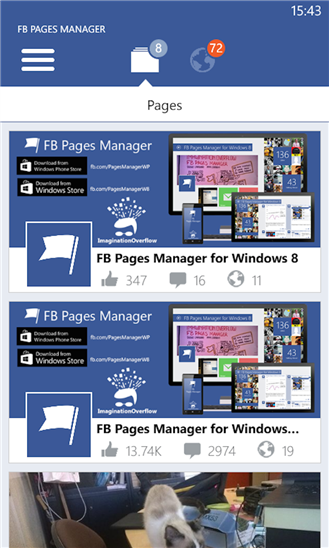
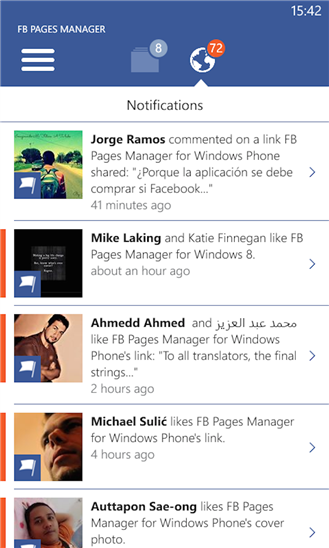
FB Pages Manager is the only fully featured Facebook Pages Manager app on Windows Phone that you can use to manage all your Facebook pages.
The app has more than 500,000 downloads and every month about 100,000 page managers use the app to talk directly to their users. It is supported in over 26 different languages thanks to our users.
Today we announce the new update that brings the following changes:
- Multi photo upload
- Video Upload
- Post edit
- Turkish support
- Both the free and Pro version are now WP 8.1 native
- The free version is now an universal app!
- Tile improvements
- Fixed all crash bugs reported, and other misc errors like, page reach insight, image saving and managing operation errors.
And a lot of more fixes and enhancements.
 |  |
| Lite Version | Full Version |
| Download Link | Download Link |
The app has two version, the free lite version has the basic features and some ads, the full version ($1.99) has all the features for an advanced Facebook page manager.
Available link for download
Sunday, November 20, 2016
ES File Explorer File Manager v4 0 4 4 Terbaru
ES File Explorer File Manager v4 0 4 4 Terbaru
Cara Instal Ulang Advan STAR Fit - Sahabat pecinta android semua, kami akan berbagi dengan anda semua tentang bagaimana membuat atau instal ulang Advan STAR Fit kamu, banyak hal yang menyebabkan kita perlu untuk instal ulang Advan STAR Fit yang mulai karena bootloop hingga karena permasalahan lain yang teradi dihape Advan STAR Fit kamu, jadi tidak perlu kwatir kami akan berbagi dengan anda semua tentang bagaimana kita akan instal ulang Advan STAR Fit dengan mudah dan gampang.
Advan STAR Fit adalah sebuah smartphone yang memakai sistem operasi android yang kita akan melakukan instal ulang android di dalamnya, dengan demikian maka kita akan mencoba menginstal ulang Advan STAR Fit, banyak hal yang menyebabkan Advan STAR Fit anda ini perlu instal ulang, salah satunya yaitu karena anda melakukan root android di Advan STAR Fit anda, sehingga Advan STAR Fit anda mengalami sistem operasi error yang tidak bisa anda gunakan lagi untuk proses pemakaian hape, sehingga baru bisa apabila anda mengainstal versi android di hape lenovo kamu.
Untuk mengantisipasi kedepannya maka gunakanlah hape Advan STAR Fit secara wajar dan jangan ulangi melakukan root Advan STAR Fit anda karena bisa berakibat fatal jika anda tidak memahami bagaimana root android yang benar, pahami dahulu benar benar bahaya dan manfaat dari root android.
Baca juga ; Kelebihan Dan Kekurangan Root Android

CARA INSTAL ULANG ADVAN STAR FIT
Berikut kami hadirkan ke anda semua tentang bagaimana melakukan instal ulang Advan STAR Fit dengan mudah dan anda bisa melakukannya sendiri dirumah nantinya, silakan ikuti setiap step dan apabila cara yang kami bagikan ini tentang cara instal ulang Advan STAR Fit ini maka silakan cari artikel lainnya di google sebagai bandingan saja.
1. Siapkan costum ROM untuk Advan STAR Fit dan silakan download di situs resmi Advan STAR Fit kamu.
2. setelah di didownload maka silakan anda pindahkan ke micro sd anda.
3. matikan hape Advan STAR Fit anda dan silakan masuk kemenu recovery mode.
4. anda bisa masuk kemenu recovery dengan menekan tombol power bersamaan dengan tombol volume down di Advan STAR Fit, jika tidak bisa masuk silakan cari reveresi di google cara masuk recovery mode di Advan STAR Fit.
5. jika sudah masuk recovery nanti ada pilihan instal zip from sd card, silakan anda pilih dengan menggerser dengan tombol volume down dan up, tekan tombol power untuk yes atau ok.
6. dan silakan tunggu karena proses instal ulang Advan STAR Fit sedang berjalan.
Demikianlah CaraInstal Ulang Advan STAR Fit Dengan Mudah, semoga bisa bermanfaat untuk kita semua dan silakan baca artikel kami yang lainnya untuk bisa menambah ilmu.
Available link for download
Subscribe to:
Posts (Atom)