Sunday, March 5, 2017
How to import Contacts in WP8
How to import Contacts in WP8
Question : How to upload contacts in Microsoft/Outlook account and sync with device?
Answer:
1. Go to "www.outlook.com"
2. Sign in with your id and password
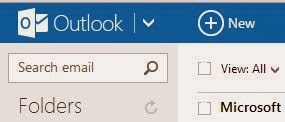
3. Click on down arrow next to the outlook logo as shown in below fig.
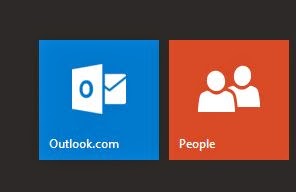
4. Select people option as shown below
5. it will bring you to following screen/menu.
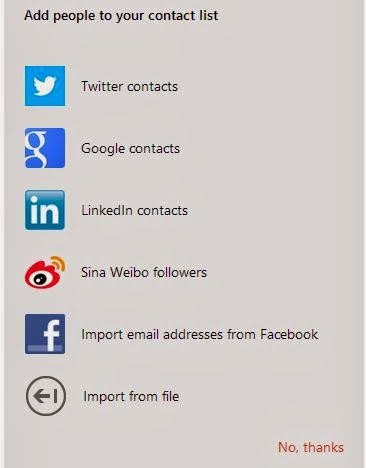
6. For e.g. to import contact from your google account then select google and feel-up required details it will directly import your google contacts to your outlook account
7. If you want to import contacts from .csv file then select last option "import from file" option.
Available link for download

Saturday, February 11, 2017
For Developers Telerik release Universal Controls for W8 1 WP8 1
For Developers Telerik release Universal Controls for W8 1 WP8 1

Important Windows Phone tool provider Telerik has released its first controls for the new Windows 8.1/WP8.1 Universal apps.
Their UI for Windows Universal includes 6 universal controls and 1 Windows Phone 8.1 specific control.
The list includes:
- Chart. The control supports various chart series, among which are Bar, Line, Area, Pie, Scatter, Polar and OHLC. Additional features include multiple data series, annotations; empty values pan&zoom interaction.
- DataBoundListBox is currently available for Windows Phone 8.1 only. It will become universal with the official Q3 2014 release. Some of the supported features are: UI virtualization for large data sets, pull to refresh, item animations, multi-selection, item reordering, empty content etc.
- DatePicker enables selecting day, month and year. Developers can change the format of the displayed date or how the date elements (day/month/year) are arranged. Furthermore developers can define ranges of dates, thus limiting what dates the end users can select.
- TimePicker enables selecting time, hour and minute. Developers can change the format of the displayed time or how the time elements (hour/minute) are arranged.
- AutoCompleteBox can be populated either by a local array or remote data like movies database or list of stocks coming from an online service. The performance remains fast and fluid when working with suggestions and large sets of data.
- BusyIndicator allows developers to display an animation indicating that the application is busy waiting for an asynchronous operation to finish. The control comes with a bunch of predefined animations but also allows for setting a custom one.
Telerik plans to eventually move all UI for Windows 8 controls in their new UI for Windows Universal collection and also notes that they aim to allow developers to compile not just for the Windows platform, but also for iOS and Android.
Read more and find the download links at Telerik’s blog here.
Available link for download
Saturday, November 26, 2016
Internet Download Manager LZ Pro WP8 1 Patched Xap
Internet Download Manager LZ Pro WP8 1 Patched Xap

Internet Download Manager [LZ] Pro (Version 3.0.2.0)
tools+productivity
First things first. The main feature this app offers is to Download LARGE Files of any type in background
(In-App as well) and then TRANSFER THEM TO PC.
Isnt it interesting! Instead of keeping your entire PC On for hours together to download a large file, your
Windows Phone can do the download. Download a file using this app and then send it to PC and make use of it.
Best for downloading large games, movies, any software and then transfer them to PC and have fun!
Key Features:
• Download any file in background and keep track of it using live tiles and toast notifications.
• Pin the respected file via pin button on that file in downloads list to see progress on home screen.
• File can be Transferred to PC. Transfer can also be paused and then resumed. File transfer requires IDM [LZ] Server to be running on your PC. Download IDM [LZ] Server from http://www.leozues.com/idmlzserver
• Share file using Bluetooth to any other Bluetooth device-not just Windows Phone!
• Share files over Wi-Fi! Superfast file sharing to any other device like Phone/PC in LAN!
• Any supported file type can be opened if respected app is installed.
• Music, Images, Videos and any other file can be copied to Phone/SDCard.
• In-App Download Option is free from all the restrictions which are in background
downloads.
• Export/Import of files b/w Phone and App Storage
• Default Download Locations based on file types -Save to Phone/SDCard Directly
• YouTube video downloader -integrated.
• Extract Videos, Images, Music links from Webpages and download them!
• Text/Picture Password Protection.
• Trial mode(if available) limits only background downloads file size to 30MB and has Ads.
Requires:
• Wi-Fi for > 20MB files background download.
• Wi-Fi for transfer to PC for WP8.(USB, Zune for WP7)
Demonstration:
http://www.leozues.com/idmlzserver
Designed & Developed by Nizam(LeoZues)
Update v3.0.2:
• Links can be opened from IE Browser directly in IDM[LZ] without any need of copy/paste.
• Follow this short 3 step guide at http://www.leozues.com/idmlz/openfromie.html
• File sharing is now universal and files can be shared with any Share Target including Bluetooth & NFC.
• Few bugs fixed!
Update v3.0.1 :
• Minor important fixes and improvements.
Update v3.0 :
• Support for Windows Phone 8.1
• Save files on Phones Public Folder or SDCard directly.
• Choose a default download location based on different file type separately.
• Import files into app storage to provide password protection and share-ability to files.
• Now Includes Download Speed indicator as well as Estimated Time of download for both Background and In-App Downloads
• App Storage and Downloaded Files list are now separate. App Storage lists the files saved in the app where as Downloaded Files List displays all downloaded files with their respected save locations.
• Multi-Selection is now supported.
• Few improvements and bug fixes.
Last updated :-
09-05-2014
Version :-
3.0.2.0
Works with :-
Windows Phone 8.1
Windows Phone 8
Windows Phone 7.5
Grab your copy HERE
Available link for download
Tuesday, October 11, 2016
How to the stream videos from Enigma2 receiver to WP8 with VLC Media Player
How to the stream videos from Enigma2 receiver to WP8 with VLC Media Player
1. install VLC Player to PC http://get.videolan.org/vlc/2.1.3/win32/vlc-2.1.3-win32.exe
2. run VLC Player and go to Tools - Preferences
3. select All in Show settings
4. under Interface select Main Interfaces. Enable Web.
5. double click on Main Interfaces and select Lua. Under Lua HTTP enter password (you can use something simple as vlc)
6. save and restart VLC Player
7. install Video Player for VLC to phone http://windowsphone.com/s?appId=2b27eb95-c86f-4989-8c81-3d4efa994654
8. run Video Player for VLC on phone (VLC player must run on computer and phone connected to WiFi network). computer local IP address will shown on list or add manually to settings....
thats all for that part... now you only need stream link address from your Enigma2 receiver. best way to do that is WebInterface on Enigma2 receiver. Enter receiver local IP address in web browser to open WebInterface and find which channel you want stream. click on icon for stream channel to make stream.m3u file. now in Video Player for VLC on phone open this m3u file or manually enter the address...
WebInterface in the VU+ DUO2 receiver
Available link for download
Monday, September 12, 2016
HTC announce that the HTC 8S will never get the WP8 1 update 1
HTC announce that the HTC 8S will never get the WP8 1 update 1

HTC has announced on their support forums that, after much discussion with Microsoft, that the HTC 8S does not meet the hardware criteria for the Windows Phone 8.1 GDR1 Preview.
HTC does not reveal the issue, but I suspect it may be related to the small amount of internal storage (only 4 GB) on the handset.
In better news however HTC has also said that they will start pushing out the WP8.1 GDR1 update to HTC 8X users, after some time, to assess the stability of the device with the OS.
While Microsoft has done an excellent job bringing the software to the cheapest Nokia Lumia, the HTC 8S was always designed as a cheap handset, and as such the expectation of multiple future updates may be limited.
Are our readers overly disappointed or surprised by this decision? Let us know below.
Available link for download