Showing posts with label phones. Show all posts
Showing posts with label phones. Show all posts
Monday, July 31, 2017
HOW TO ROLLBACK FROM WINDOWS 10 TECHNICAL PREVIEW TO WINDOWS 8 1 FOR PHONES
HOW TO ROLLBACK FROM WINDOWS 10 TECHNICAL PREVIEW TO WINDOWS 8 1 FOR PHONES
Windows 10 preview
It has been a day since Windows 10 Preview for phone was released for many devices after a wait and youve probably realized that it is far from being finished. While you had fun checking out the Preview, you want to go back to a more stable build. If you want to roll back to Windows Phone 8.1, Microsoft has made it really simple. Youll need a computer, your phone, a USB cable, and the Windows Phone Recovery Tool. make sure that your computer and phone are charged. Are you ready? Continue reading for the next steps.Rollback
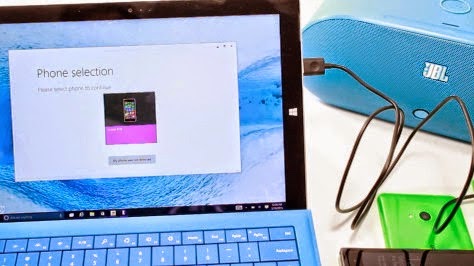
1.Download and install the Windows Phone Recovery Tool to your computer.2.Open the Windows Phone Recovery Tool and connect the phone to your computer with the USB cable. If your phone is not automatically detected, disconnect it from your computer and press My phone was not detected at the bottom and follow the instructions on the screen.
3.If the phone is detected, tap the phone model on the screen to continue.
4.The next screen shows software versions. Tap the reinstall button at the bottom
5.Theres a disclaimer that suggests to backup your phone. Tap continue at the bottom.
6.The recovery tool downloads and installs the firmware. This may take a while depending on your network connection. The installation files are about 1.7 GB. Make sure not to disconnect the cable.
7.If all goes well, you get a message that says, "Operation successfully completed."
Thats it! You should now be back on Windows Phone 8.1. Well let you know if a new build for Windows 10 Preview for phone shows up.
Source - www.Facebook.com//520NL
For more details stay tuned -- http://facebook.com/lumians.world
Thanks for visiting us :-)
Available link for download

Sunday, July 30, 2017
How to Use Volcano Tool JIG Cable As USB Cable To Flash MTK 625A 62xx Phones
How to Use Volcano Tool JIG Cable As USB Cable To Flash MTK 625A 62xx Phones
Here is the tutorial to use volcano tool JIG cable as a USB cable to flash the MediaTek CPU phones which support USB flashing. This topic will help you to flash MTK phones, which support USB flashing i.e. MT625A/62xx using volcano JIG Cable, that means no need to use USB cable to flash this type of phone. If the USB cable damage or not detect the phone then this process will solve these problems. For more details about this please see the below details.
What does it means?
Normally when you flash a phone which has MTK CPU 625A or 62xx, you are using a USB cable for this. When click on Start on Volcano Tool to flash MTK phone you see Analysis of USB port,Please insert phone USB cable then you insert the USB cable to the phone, but some times the phone is not detected with USB cable, in that case you can easily use the Volcano JIG cable as a USB cable to flash this type of phones.
Example:
Here is the example of Micromax X261 which has a MTK 6252 CPU and can be flash using USB cable on Volcano Tool, but here you will know how to flash this phone using Volcano Jig cable by using it USB cable.
How to Use Volcano Tool JIG as USB Cable?
Open volcano tool
Go to MTK tab
Select Read Flash
Choose Boot_11 v5.1232 (625A/62xx)
Select USB mode
Click on Start
See the below Image
 |
| Micromax X261 Read Flash Using Volcano JIG Cable |
Connect the phone using Volcano Tool JIG cable (i.e. Micromax x261)
After Click on Start
Go to Detect Tab
Select [D+/D-] MTK USB & Mstar Do Find Boot
Click on Detect ( After detecting complete)
Click on Set Pinout
 |
| Micromax X261 Set Pinout To Read Flash Volcano Tool |
Thats all it will read flash of Micromax X261 and you are done. In this way you can use the Volcano box JIG cable as USB cable to flash MTK 625A phones
Follow the above steps carefully to use volcano JIG as a USB Cable to flash MTK 625A/62xx phones.
Available link for download
Tuesday, February 28, 2017
Heres Whats New in Windows 10 For Phones build 10080
Heres Whats New in Windows 10 For Phones build 10080
The new Build is here with new features and of course new bugs. The update is about 500 MB. This is a Fast ring build so be aware there are some bugs that will affect your experience with it, make sure to read the known issues below before installing.
Here is what’s new:
Windows Store Beta for phones: This build brings a first look at the new Windows Store in Windows 10 for phones. You will see it designated as Store (Beta). The Store Beta has a new visual design and if you’ve been using the Store Beta on PC, it should feel familiar since it’s the built using the new Universal Windows Platform code. As a beta, there are a couple of known issues to be aware of with this Store app. Both the app selection and markets where the Store Beta is available are limited in this release. You can browse and search, as well as download apps. You can pay for those apps and games with options such as international credit card, gift cards and PayPal. However, carrier billing is not enabled yet. At Build, we announced that all Windows 10 devices (not just phones), will be able to support carrier billing. That means that the growing number of carrier billing connections we have today may be used by Windows 10 customers to purchase all Store content. We’re also adding music, movies and TV shows into the Store for you to purchase and access across all your devices. Movies & TV page is functional. Music is not available in this build but will be coming soon. And just like on PC, the current Windows Store remains available in this build.
Windows Store Beta for phones: This build brings a first look at the new Windows Store in Windows 10 for phones. You will see it designated as Store (Beta). The Store Beta has a new visual design and if you’ve been using the Store Beta on PC, it should feel familiar since it’s the built using the new Universal Windows Platform code. As a beta, there are a couple of known issues to be aware of with this Store app. Both the app selection and markets where the Store Beta is available are limited in this release. You can browse and search, as well as download apps. You can pay for those apps and games with options such as international credit card, gift cards and PayPal. However, carrier billing is not enabled yet. At Build, we announced that all Windows 10 devices (not just phones), will be able to support carrier billing. That means that the growing number of carrier billing connections we have today may be used by Windows 10 customers to purchase all Store content. We’re also adding music, movies and TV shows into the Store for you to purchase and access across all your devices. Movies & TV page is functional. Music is not available in this build but will be coming soon. And just like on PC, the current Windows Store remains available in this build.
Universal Office apps: Now that the Store Beta is included in this build, you can download theWord, Excel, PowerPoint and OneNote Preview apps. For more information on the Universal Office apps – read this blog post from the Office Blog. We know that you’ve been waiting to try these apps on your phones, so we’re very excited for them to be available for you now.
Xbox app: The Xbox app for Windows 10 is also now available for phones in the Store Beta (version 4.4.230). With the Xbox app on your phone – you can access your activity feed, achievements, friends list, activity alerts, messages, watch Game DVR clips, and connect to your Xbox One. For more information, see this post on Xbox Wire.
Music Preview app: Access your music collection and play all your music – including songs you have added to OneDrive. The new experience for Now Playing makes it easy to swipe between songs and it looks great. We’ve got more improvements coming in future app updates that will be delivered through the Store Beta including a Live Tile showing what’s currently playing, pinning favorites to your Start screen, exploring the full catalog and listening to Radio with an Xbox Music Pass, support for Kids Corner, the ability to shop for music in the Store Beta, and more. Download the Music Preview app here.
Video Preview app: Browse and play video files (including MKV files!) on your device. Try out filtering and sorting your collection and adding a folder of videos to include in your collection. You can also browse and play movies and TV shows you’ve purchased and rented from Xbox Video. Try starting a purchased video on your PC or Xbox and pick up playback right where you left off on your phone. In a future app update, we’ll be adding the ability to download movies and TV shows for offline playback, new device management so you can manage your offline downloads on the devices you care about, improved search results, movie reviews and cast info, and more! Download the Video Preview app here.
Check out the new Camera app: We want your feedback on the new Camera app for Windows 10! Make the Camera app your default camera app by going to Settings > System > Photos & Camera (or pin it to your Start screen) and let us know what you think. Note that high-end Lumia devices (1520, 1020, 930, 830, 640, and 640XL) have some features not supported by the new Camera app. For these devices, the new app will work but to get the full functionality from your device you will need to use the Lumia Camera app. In coming weeks we’ll have updated versions of Camera apps with the superset of all features. Here are a few things to try: try out HDR (click the magic wand button), video stabilization for video and look for faces getting recognized (not identified) in the camera preview window (will help with autofocus).
A few fixes: We have fixed a few things in this build. Tapping on an e-mail notification now launches you into that e-mail message instead of the calendar. Incoming calls should play a ringing sound now.
Here are some known issues
- We’re aware of several migration issues after upgrading to this build.
- After upgrading, you may see duplicate tiles for apps like Search and Phone under All Apps.
- “Pending” may show under some apps after upgrade and those apps are unresponsive. Restarting the phone will clear the pending flag and the apps should work.
- All data and settings for apps installed on a SD card do not get migrated and you cannot launch these apps or install them again. Workaround is to uninstall then reinstall these apps.
- The old email app will still show up after upgrade in All Apps list with “Error” text displayed and cannot be removed. This app also shows up banged out on the Start screen if it was pinned previously. It can simply be unpinned to remove.
- When upgrading from Windows Phone 8.1 to this build, even if you have your cellular data connection turned on, it will get turned off during upgrade. Go to Settings > Network & wireless > Cellular and SIM to turn it back on.
- VERY IMPORTANT: there is a condition in which you may never receive MMS messages. Usually when someone sends you a MMS message and your phone’s cellular data connection is turned off, you will receive a “Get message” link in the text thread from the sender, allowing you to download the message once you turn your cellular data back on. There is a bug in which this link is not received in this case and the MMS message is completely lost. To ensure MMS messages are not lost, be sure to turn cellular data on (via Settings > Network & wireless > Cellular & SIM > Data connection). This issue will occur any time your cellular data connection is turned off in this build.
- If you are in a region where Cortana is enabled (US, China, UK, France, Italy, Germany, or Spain) and you have changed the default shipping language on your phone – please ensure that your region, language, and speech settings are restored to their default values before initiating the update. This is required in order to avoid a bug that will cause Cortana/Search to repeatedly crash.
- After upgrade, uninstalling an app may not remove it from the All Apps list. Usually restarting your device resolves this issue.
- Playback of movies and TV may fail with error 0x8004c029 in the Video Preview app. If it does, go here to learn more about how to fix it.
- After upgrading, the Twitter app may crash on launch. If you uninstall and reinstall the app, it should work.
- Auto-update for apps is not enabled in this build for apps installed via Store Beta. You will have to manually check for updates.
- After upgrading from Build 10052, the Insider Hub still does not launch. However, if you upgrade from Windows Phone 8.1 the Insider Hub should now launch.
SOURCE – MICROSOFT
Also Read Best 5 Features of Windows 10 for phone
Are You Exited About The New Build ? Share your Thoughts With Us………
Available link for download
Sunday, February 12, 2017
Free download games 240x400 touch screen basic phones
Free download games 240x400 touch screen basic phones
DOWNLOAD
Free download games 240x400 touch screen basic phones
Available link for download
Monday, December 19, 2016
Exclusive New Windows 10 for phones Build screenshots leaked
Exclusive New Windows 10 for phones Build screenshots leaked

A new set of leaked screenshots of Windows 10 for phones have surfaced, this time in English. The build number is also different, with the version cited as 8.15.12521.


The screenshots reveal functionality that will allow users to set customizable LED notification colors for app alerts. Redesigned settings section with toggle settings, the new People app as well as Outlook account creation and deletion process are also highlighted.


OneDrive backup also gets showcased, with the feature set to allow users to back up app data to the cloud service.


Theres no word on when the next Windows 10 preview for phones will be available,stay tuned to know more.


Source: Windows Mania.
Stay Connected To Us,
Like Our Facebook Page,
Join Our Facebook Group.
Also follow us on Twitter.
Available link for download
Friday, December 16, 2016
Hot Microsoft officially Unveils Windows 10 for Phones All Features n Screens
Hot Microsoft officially Unveils Windows 10 for Phones All Features n Screens

Microsoft officially Unveils Windows 10 for Phones
Microsoft has just revealed Windows 10 at its event. Alongside Windows 10, the company has revealed the upcoming, major version of Windows 10 for Phones! The latest version of Windows Phone comes with a lot of new features.
Microsoft has just showed off a new feature that’ll sync your action center on your desktop with yourWindows Phone which is pretty cool. Microsoft has also revealed a new settings page for Windows Phone. The update will also come with the ability to easily reply to notifications. You can also resize the keyboardon large Windows Phones. Microsoft has also promised that the Message app on Windows Phone will sync with Skype sometime soon.
Update 1:
Action center has also been given an update, you can have even more action center shortcuts, again much like on the PC. The Modern UI apps on the desktop also run on the phone, as they are Universal Apps.
App Screen:
App screen as been updated as well. recently used n most used apps will be sortable on the top.

Not only that, but actionable notifications are finally a thing, which allow you to answer texts from anywhere within the operating system. Joe Belfiore claims a preview for Windows Insiders will be coming in “a little while”
Update 2:
Keyboard
Windows 10 for phones will bring an updated keyboard for even more efficiency for all users.

Joe Belfiore showed how users can drag up from the space bar to change the location of the keyboard and change its’ size for those will smaller hands. Also, you will now be able to type out messages via Cortana, which can be accessed by a small button above the keyboard.
Voice typing is now supported, and the keyboard is repositionable.

The keyboard also has a small circle between the Z and X keys which Joe Belfiore didn’t bring up.
Update 3:
Notification Tray
This is the new notification tray.


Many new quick action buttons are now supported.
Settings:
Settings are now more organized and grouped.

Toast :
Toast notifications are now actionably.

Calender:
The new calendar app is a lot more colourful.

Photo App:
The new photos app will automatically enhance your picture and also automatically create albums.


People Hub:
Gets some changes n new features.

Xbox Music app:
It will support a new OneDrive music locker which will arrive in 2 months.

The apps have the full power of office, including, review, formatting and everything else, and is powered by hardware acceleration.
More to come…Stay tuned
Available link for download
Sunday, December 11, 2016
Exclusive Next W10 TP Build for Phones Will Support 930 925 1520
Exclusive Next W10 TP Build for Phones Will Support 930 925 1520

Gabriel Aul Replied to an question in Twitter, asking about that, Will Lumia 925 support next W10 technical preview update. He replied that they are working on 925.
Later on another user questioned that, Will Lumia 1520 support next he said yes.

As earlier He has already told that Lumia 930 will support next build. Which makes three more lumias to support next W10 TP build.
It is not confirmed that any other Lumias will support W10 TP next build or not.
Final List will be revealed later. So stay tuned for Latest infos.
Stay Connected To Us,
Like Our Facebook Page,
Join Our Facebook Group.
Also follow us on Twitter.
Available link for download
Sunday, November 20, 2016
Gallery Windows 10 Technical Preview for Phones build 10051
Gallery Windows 10 Technical Preview for Phones build 10051
Windows 10 Technical Preview for phones build 10051 is here..

We have go the hands-on with the latest Windows 10 update for windows insiders.
This update has alot of new exciting features, I have made a highlights of whats new:
New Icons
You can see changes in the icons and layouts of the status bar at the top and the sizes of back, start and search also increased!
Its now looking much similar to the Windows 10 on PC so Microsoft is heading nicely towards Universal App Platform.

Updated Alarm & Calculator App
There are many improvements in Alarm app which is rebranded to Alarm & Clock
While on the other hand, Calculator app also gets Feedback option and lots of UI improvements.


Improvements in Camera App
Not much to talk about but there were some UI improvements in settings menu. And also it grabs some speed for taking shots.
Cortana
Again UI tweaks! And now Cortana supports more regions.
Insider Hub
Insider Hub included in this build which is a Dashboard for the Windows Insiders. But unfortunately its unusable in most of the devices.
Messaging App
So here is something New, Messaging app gets overhauled. Totally new design interface. But its still in early stages so make contain bugs. But I found its cool!


Outlook Apps
One of the most awaited feature in Windows 10. New Outlook Calender and Outlook Mail app. There are many great things about these two. Now you have a gesture way of swiping left/right to hanlde your mails. Mail app also has full Word integration with all cool formatting just lik on PC. Also Calender app has many briliant features. But I found bugs in Outlook Mail app, but anyways its there! :)


New Peoples Hub
New People app included this build which resembles to the Design of Messaging app just like round icons of the person. But I also found it most buggy app of this build(its in alpha version), Microsoft also included old People App as named People Legacy.


Project Spartan
Another Big Feature as said by Gabe Aul on twitter in this build.
Most awaited browser comes to windows phone after a week on PC release.
It still contains rough edges, but its very userfriendly so far.


Phone App
New designed phone app with better dialer pad with bigger buttons and have a new application bar windows 10 styled icons.
Settings App
Though there is not alot here, but some things are note taking.
New icon colours resembles the Accent Color of your phone.
Now you can pin individual settings to the startscreen.
Also many settings menu desgined like Windows 10 styled.


Voice Recorder
Microsoft rebranded Sound Recorder to Voice Recorder and with many UI tweaks you will get many better performance

Misc Changes
Now when switching apps using pressing and holding back key you will see new interface of changing apps with App name at the topThe Extra Large tile sizes will be not there in this build.New Windows Feedback appNew Dialog Boxes everywhere, feels more Windows 10 on PCPhotos app is much stable and fast, also gets Enhance feature

Problems/Issues You may face
This is preproduction software going out to the Fast ring – so you should expect to see some bugs. The list below are some of the ones that we thought you should know about up front, and it’s worth reading carefully. We’re working to fix all of these in future builds.
•There might be situations in which auto-upload of your Camera Roll to OneDrive may not be working. Please be sure to back up your photos especially if you need to use the Windows Phone Recovery Tool to go back to Windows Phone 8.1.
•The Office Hub has been removed from this build. You won’t be able to open Word, Excel, PowerPoint or OneNote files in this build. Preview versions of the universal Office apps will be available in the coming weeks.
•All Bluetooth-based interactions with Cortana are not working in this build because we’re reworking how Cortana interacts with Bluetooth. This includes dictating and reading text messages, initiating searches and chit-chat, and all system-level control (such as playing music, launching applications, or navigating settings.
•After upgrade, some apps that have been installed onto a SD memory card will fail to launch. To fix this, uninstall and reinstall the apps.
•About 1% of the time, incoming phone calls may not play a ringing sound.
•Call + SMS filtering will not work after upgrade.
•For people upgrading their phone from Build 9941, there is a bug in which your phone’s MMS settings will be lost after upgrade. The new Messaging app doesn’t yet have the ability to re-enter these settings. You will need to use the Windows Phone Recovery Tool to go back to Windows Phone 8.1 and then upgrade to this build to get MMS working again.
•Also for people upgrading their phone from Build 9941, the tiles on your Start screen for the Camera and Photos apps may be missing or corrupt. You will have to unpin any corrupt tiles and re-pin the apps to your Start screen.
•On some phones, due to a scaling bug the dismiss button won’t be visible when an alarm is triggered. To stop your phone from “alarming “just touch the arrow and swipe up on the notification and off the screen to end the alarm.
•On phones with 512MB of memory, apps can randomly crash due to an issue with memory management.
•Flight mode cannot be enabled.
•Data connections can’t be disabled.
•You may need to re-pin the Phone app after upgrade.
•The Insider Hub is now included on Phone but may fail to launch on some phonesMany apps may have blank tiles, you will need to reinstall them
Wrapping Up
So, I guess many of you tried this build which almost to all devices except Lumia 925, 930
I also recommend this build to try if you havent yet. But you know it still early stages so, you have to give feedbacks to give a hand in this Biggest OS yet - Windows 10.
We have go the hands-on with the latest Windows 10 update for windows insiders.
This update has alot of new exciting features, I have made a highlights of whats new:
New Icons
You can see changes in the icons and layouts of the status bar at the top and the sizes of back, start and search also increased!
Its now looking much similar to the Windows 10 on PC so Microsoft is heading nicely towards Universal App Platform.
Updated Alarm & Calculator App
There are many improvements in Alarm app which is rebranded to Alarm & Clock
While on the other hand, Calculator app also gets Feedback option and lots of UI improvements.
Improvements in Camera App
Not much to talk about but there were some UI improvements in settings menu. And also it grabs some speed for taking shots.
Cortana
Again UI tweaks! And now Cortana supports more regions.
Insider Hub
Insider Hub included in this build which is a Dashboard for the Windows Insiders. But unfortunately its unusable in most of the devices.
Messaging App
So here is something New, Messaging app gets overhauled. Totally new design interface. But its still in early stages so make contain bugs. But I found its cool!
Outlook Apps
One of the most awaited feature in Windows 10. New Outlook Calender and Outlook Mail app. There are many great things about these two. Now you have a gesture way of swiping left/right to hanlde your mails. Mail app also has full Word integration with all cool formatting just lik on PC. Also Calender app has many briliant features. But I found bugs in Outlook Mail app, but anyways its there! :)
New Peoples Hub
New People app included this build which resembles to the Design of Messaging app just like round icons of the person. But I also found it most buggy app of this build(its in alpha version), Microsoft also included old People App as named People Legacy.
Project Spartan
Another Big Feature as said by Gabe Aul on twitter in this build.
Most awaited browser comes to windows phone after a week on PC release.
It still contains rough edges, but its very userfriendly so far.
Phone App
New designed phone app with better dialer pad with bigger buttons and have a new application bar windows 10 styled icons.
Settings App
Though there is not alot here, but some things are note taking.
New icon colours resembles the Accent Color of your phone.
Now you can pin individual settings to the startscreen.
Also many settings menu desgined like Windows 10 styled.
Voice Recorder
Microsoft rebranded Sound Recorder to Voice Recorder and with many UI tweaks you will get many better performance
Misc Changes
Now when switching apps using pressing and holding back key you will see new interface of changing apps with App name at the topThe Extra Large tile sizes will be not there in this build.New Windows Feedback appNew Dialog Boxes everywhere, feels more Windows 10 on PCPhotos app is much stable and fast, also gets Enhance feature
Problems/Issues You may face
This is preproduction software going out to the Fast ring – so you should expect to see some bugs. The list below are some of the ones that we thought you should know about up front, and it’s worth reading carefully. We’re working to fix all of these in future builds.
•There might be situations in which auto-upload of your Camera Roll to OneDrive may not be working. Please be sure to back up your photos especially if you need to use the Windows Phone Recovery Tool to go back to Windows Phone 8.1.
•The Office Hub has been removed from this build. You won’t be able to open Word, Excel, PowerPoint or OneNote files in this build. Preview versions of the universal Office apps will be available in the coming weeks.
•All Bluetooth-based interactions with Cortana are not working in this build because we’re reworking how Cortana interacts with Bluetooth. This includes dictating and reading text messages, initiating searches and chit-chat, and all system-level control (such as playing music, launching applications, or navigating settings.
•After upgrade, some apps that have been installed onto a SD memory card will fail to launch. To fix this, uninstall and reinstall the apps.
•About 1% of the time, incoming phone calls may not play a ringing sound.
•Call + SMS filtering will not work after upgrade.
•For people upgrading their phone from Build 9941, there is a bug in which your phone’s MMS settings will be lost after upgrade. The new Messaging app doesn’t yet have the ability to re-enter these settings. You will need to use the Windows Phone Recovery Tool to go back to Windows Phone 8.1 and then upgrade to this build to get MMS working again.
•Also for people upgrading their phone from Build 9941, the tiles on your Start screen for the Camera and Photos apps may be missing or corrupt. You will have to unpin any corrupt tiles and re-pin the apps to your Start screen.
•On some phones, due to a scaling bug the dismiss button won’t be visible when an alarm is triggered. To stop your phone from “alarming “just touch the arrow and swipe up on the notification and off the screen to end the alarm.
•On phones with 512MB of memory, apps can randomly crash due to an issue with memory management.
•Flight mode cannot be enabled.
•Data connections can’t be disabled.
•You may need to re-pin the Phone app after upgrade.
•The Insider Hub is now included on Phone but may fail to launch on some phonesMany apps may have blank tiles, you will need to reinstall them
Wrapping Up
So, I guess many of you tried this build which almost to all devices except Lumia 925, 930
I also recommend this build to try if you havent yet. But you know it still early stages so, you have to give feedbacks to give a hand in this Biggest OS yet - Windows 10.
Available link for download
Subscribe to:
Posts (Atom)