Showing posts with label technical. Show all posts
Showing posts with label technical. Show all posts
Monday, July 31, 2017
HOW TO ROLLBACK FROM WINDOWS 10 TECHNICAL PREVIEW TO WINDOWS 8 1 FOR PHONES
HOW TO ROLLBACK FROM WINDOWS 10 TECHNICAL PREVIEW TO WINDOWS 8 1 FOR PHONES
Windows 10 preview
It has been a day since Windows 10 Preview for phone was released for many devices after a wait and youve probably realized that it is far from being finished. While you had fun checking out the Preview, you want to go back to a more stable build. If you want to roll back to Windows Phone 8.1, Microsoft has made it really simple. Youll need a computer, your phone, a USB cable, and the Windows Phone Recovery Tool. make sure that your computer and phone are charged. Are you ready? Continue reading for the next steps.Rollback
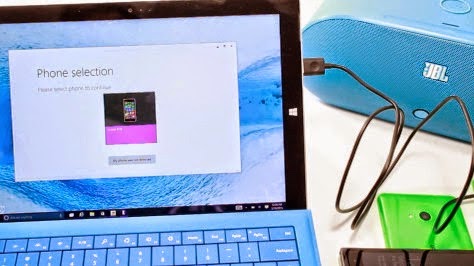
1.Download and install the Windows Phone Recovery Tool to your computer.2.Open the Windows Phone Recovery Tool and connect the phone to your computer with the USB cable. If your phone is not automatically detected, disconnect it from your computer and press My phone was not detected at the bottom and follow the instructions on the screen.
3.If the phone is detected, tap the phone model on the screen to continue.
4.The next screen shows software versions. Tap the reinstall button at the bottom
5.Theres a disclaimer that suggests to backup your phone. Tap continue at the bottom.
6.The recovery tool downloads and installs the firmware. This may take a while depending on your network connection. The installation files are about 1.7 GB. Make sure not to disconnect the cable.
7.If all goes well, you get a message that says, "Operation successfully completed."
Thats it! You should now be back on Windows Phone 8.1. Well let you know if a new build for Windows 10 Preview for phone shows up.
Source - www.Facebook.com//520NL
For more details stay tuned -- http://facebook.com/lumians.world
Thanks for visiting us :-)
Available link for download

Thursday, March 16, 2017
How to install the Win10 Technical Preview
How to install the Win10 Technical Preview
Follow the steps below to get Windows 10 Technical Preview on the supported devices.
Please have your battery charged to 50%+. The time taken for the update depends on your Internet Speed, the amount of data in your phone. PLEASE BACKUP your data once again, just for the sake of it.
Please have your battery charged to 50%+. The time taken for the update depends on your Internet Speed, the amount of data in your phone. PLEASE BACKUP your data once again, just for the sake of it.
- Get Windows Insider App from the Store
- If you have already signed up at insider.windows.com, then Launch the app and login with THAT Microsoft account.
- Choose the frequency at which you want to receive new builds. Fast or Slow.
- Confirm your acceptance of the Insider program. Remember, installing the technical preview voids your warranty.
- Hit the check mark
- Go to Settings -> Phone Update
- Check for Updates
- Then, it will go through some steps. Just follow the onscreen instructions.
Available link for download
Sunday, November 20, 2016
Gallery Windows 10 Technical Preview for Phones build 10051
Gallery Windows 10 Technical Preview for Phones build 10051
Windows 10 Technical Preview for phones build 10051 is here..

We have go the hands-on with the latest Windows 10 update for windows insiders.
This update has alot of new exciting features, I have made a highlights of whats new:
New Icons
You can see changes in the icons and layouts of the status bar at the top and the sizes of back, start and search also increased!
Its now looking much similar to the Windows 10 on PC so Microsoft is heading nicely towards Universal App Platform.

Updated Alarm & Calculator App
There are many improvements in Alarm app which is rebranded to Alarm & Clock
While on the other hand, Calculator app also gets Feedback option and lots of UI improvements.


Improvements in Camera App
Not much to talk about but there were some UI improvements in settings menu. And also it grabs some speed for taking shots.
Cortana
Again UI tweaks! And now Cortana supports more regions.
Insider Hub
Insider Hub included in this build which is a Dashboard for the Windows Insiders. But unfortunately its unusable in most of the devices.
Messaging App
So here is something New, Messaging app gets overhauled. Totally new design interface. But its still in early stages so make contain bugs. But I found its cool!


Outlook Apps
One of the most awaited feature in Windows 10. New Outlook Calender and Outlook Mail app. There are many great things about these two. Now you have a gesture way of swiping left/right to hanlde your mails. Mail app also has full Word integration with all cool formatting just lik on PC. Also Calender app has many briliant features. But I found bugs in Outlook Mail app, but anyways its there! :)


New Peoples Hub
New People app included this build which resembles to the Design of Messaging app just like round icons of the person. But I also found it most buggy app of this build(its in alpha version), Microsoft also included old People App as named People Legacy.


Project Spartan
Another Big Feature as said by Gabe Aul on twitter in this build.
Most awaited browser comes to windows phone after a week on PC release.
It still contains rough edges, but its very userfriendly so far.


Phone App
New designed phone app with better dialer pad with bigger buttons and have a new application bar windows 10 styled icons.
Settings App
Though there is not alot here, but some things are note taking.
New icon colours resembles the Accent Color of your phone.
Now you can pin individual settings to the startscreen.
Also many settings menu desgined like Windows 10 styled.


Voice Recorder
Microsoft rebranded Sound Recorder to Voice Recorder and with many UI tweaks you will get many better performance

Misc Changes
Now when switching apps using pressing and holding back key you will see new interface of changing apps with App name at the topThe Extra Large tile sizes will be not there in this build.New Windows Feedback appNew Dialog Boxes everywhere, feels more Windows 10 on PCPhotos app is much stable and fast, also gets Enhance feature

Problems/Issues You may face
This is preproduction software going out to the Fast ring – so you should expect to see some bugs. The list below are some of the ones that we thought you should know about up front, and it’s worth reading carefully. We’re working to fix all of these in future builds.
•There might be situations in which auto-upload of your Camera Roll to OneDrive may not be working. Please be sure to back up your photos especially if you need to use the Windows Phone Recovery Tool to go back to Windows Phone 8.1.
•The Office Hub has been removed from this build. You won’t be able to open Word, Excel, PowerPoint or OneNote files in this build. Preview versions of the universal Office apps will be available in the coming weeks.
•All Bluetooth-based interactions with Cortana are not working in this build because we’re reworking how Cortana interacts with Bluetooth. This includes dictating and reading text messages, initiating searches and chit-chat, and all system-level control (such as playing music, launching applications, or navigating settings.
•After upgrade, some apps that have been installed onto a SD memory card will fail to launch. To fix this, uninstall and reinstall the apps.
•About 1% of the time, incoming phone calls may not play a ringing sound.
•Call + SMS filtering will not work after upgrade.
•For people upgrading their phone from Build 9941, there is a bug in which your phone’s MMS settings will be lost after upgrade. The new Messaging app doesn’t yet have the ability to re-enter these settings. You will need to use the Windows Phone Recovery Tool to go back to Windows Phone 8.1 and then upgrade to this build to get MMS working again.
•Also for people upgrading their phone from Build 9941, the tiles on your Start screen for the Camera and Photos apps may be missing or corrupt. You will have to unpin any corrupt tiles and re-pin the apps to your Start screen.
•On some phones, due to a scaling bug the dismiss button won’t be visible when an alarm is triggered. To stop your phone from “alarming “just touch the arrow and swipe up on the notification and off the screen to end the alarm.
•On phones with 512MB of memory, apps can randomly crash due to an issue with memory management.
•Flight mode cannot be enabled.
•Data connections can’t be disabled.
•You may need to re-pin the Phone app after upgrade.
•The Insider Hub is now included on Phone but may fail to launch on some phonesMany apps may have blank tiles, you will need to reinstall them
Wrapping Up
So, I guess many of you tried this build which almost to all devices except Lumia 925, 930
I also recommend this build to try if you havent yet. But you know it still early stages so, you have to give feedbacks to give a hand in this Biggest OS yet - Windows 10.
We have go the hands-on with the latest Windows 10 update for windows insiders.
This update has alot of new exciting features, I have made a highlights of whats new:
New Icons
You can see changes in the icons and layouts of the status bar at the top and the sizes of back, start and search also increased!
Its now looking much similar to the Windows 10 on PC so Microsoft is heading nicely towards Universal App Platform.
Updated Alarm & Calculator App
There are many improvements in Alarm app which is rebranded to Alarm & Clock
While on the other hand, Calculator app also gets Feedback option and lots of UI improvements.
Improvements in Camera App
Not much to talk about but there were some UI improvements in settings menu. And also it grabs some speed for taking shots.
Cortana
Again UI tweaks! And now Cortana supports more regions.
Insider Hub
Insider Hub included in this build which is a Dashboard for the Windows Insiders. But unfortunately its unusable in most of the devices.
Messaging App
So here is something New, Messaging app gets overhauled. Totally new design interface. But its still in early stages so make contain bugs. But I found its cool!
Outlook Apps
One of the most awaited feature in Windows 10. New Outlook Calender and Outlook Mail app. There are many great things about these two. Now you have a gesture way of swiping left/right to hanlde your mails. Mail app also has full Word integration with all cool formatting just lik on PC. Also Calender app has many briliant features. But I found bugs in Outlook Mail app, but anyways its there! :)
New Peoples Hub
New People app included this build which resembles to the Design of Messaging app just like round icons of the person. But I also found it most buggy app of this build(its in alpha version), Microsoft also included old People App as named People Legacy.
Project Spartan
Another Big Feature as said by Gabe Aul on twitter in this build.
Most awaited browser comes to windows phone after a week on PC release.
It still contains rough edges, but its very userfriendly so far.
Phone App
New designed phone app with better dialer pad with bigger buttons and have a new application bar windows 10 styled icons.
Settings App
Though there is not alot here, but some things are note taking.
New icon colours resembles the Accent Color of your phone.
Now you can pin individual settings to the startscreen.
Also many settings menu desgined like Windows 10 styled.
Voice Recorder
Microsoft rebranded Sound Recorder to Voice Recorder and with many UI tweaks you will get many better performance
Misc Changes
Now when switching apps using pressing and holding back key you will see new interface of changing apps with App name at the topThe Extra Large tile sizes will be not there in this build.New Windows Feedback appNew Dialog Boxes everywhere, feels more Windows 10 on PCPhotos app is much stable and fast, also gets Enhance feature
Problems/Issues You may face
This is preproduction software going out to the Fast ring – so you should expect to see some bugs. The list below are some of the ones that we thought you should know about up front, and it’s worth reading carefully. We’re working to fix all of these in future builds.
•There might be situations in which auto-upload of your Camera Roll to OneDrive may not be working. Please be sure to back up your photos especially if you need to use the Windows Phone Recovery Tool to go back to Windows Phone 8.1.
•The Office Hub has been removed from this build. You won’t be able to open Word, Excel, PowerPoint or OneNote files in this build. Preview versions of the universal Office apps will be available in the coming weeks.
•All Bluetooth-based interactions with Cortana are not working in this build because we’re reworking how Cortana interacts with Bluetooth. This includes dictating and reading text messages, initiating searches and chit-chat, and all system-level control (such as playing music, launching applications, or navigating settings.
•After upgrade, some apps that have been installed onto a SD memory card will fail to launch. To fix this, uninstall and reinstall the apps.
•About 1% of the time, incoming phone calls may not play a ringing sound.
•Call + SMS filtering will not work after upgrade.
•For people upgrading their phone from Build 9941, there is a bug in which your phone’s MMS settings will be lost after upgrade. The new Messaging app doesn’t yet have the ability to re-enter these settings. You will need to use the Windows Phone Recovery Tool to go back to Windows Phone 8.1 and then upgrade to this build to get MMS working again.
•Also for people upgrading their phone from Build 9941, the tiles on your Start screen for the Camera and Photos apps may be missing or corrupt. You will have to unpin any corrupt tiles and re-pin the apps to your Start screen.
•On some phones, due to a scaling bug the dismiss button won’t be visible when an alarm is triggered. To stop your phone from “alarming “just touch the arrow and swipe up on the notification and off the screen to end the alarm.
•On phones with 512MB of memory, apps can randomly crash due to an issue with memory management.
•Flight mode cannot be enabled.
•Data connections can’t be disabled.
•You may need to re-pin the Phone app after upgrade.
•The Insider Hub is now included on Phone but may fail to launch on some phonesMany apps may have blank tiles, you will need to reinstall them
Wrapping Up
So, I guess many of you tried this build which almost to all devices except Lumia 925, 930
I also recommend this build to try if you havent yet. But you know it still early stages so, you have to give feedbacks to give a hand in this Biggest OS yet - Windows 10.
Available link for download
Wednesday, September 21, 2016
Free Download Windows 10 Technical Preview
Free Download Windows 10 Technical Preview

Follow these steps to download Technical Preview:
Sign up for the Windows Insider Program.
Read the System Requirements.
Click one of the Download links on this page to download a special file—its called an ISO file—that you can use to install the preview.
When the download is complete, transfer the ISO file to installation media such as a DVD or USB flash drive.
Double-tap or double-click setup.exe from the installation media, and then follow the steps.
Product Key: NKJFK-GPHP7-G8C3J-P6JXR-HQRJR
Download links :-
English 64-bit (x64)
Download (3.81 GB)
English 32-bit (x86)
Download (2.93 GB)
English (United Kingdom) 64-bit (x64)
Download (3.79 GB)
English (United Kingdom) 32-bit (x86)
Download (2.94 GB)
Chinese (Simplified) 64-bit (x64)
Download (3.96 GB)
Chinese (Simplified) 32-bit (x86)
Download (3.05 GB)
Portuguese (Brazil) 64-bit (x64)
Download (3.76 GB)
Portuguese (Brazil) 32-bit (x86)
Download (2.91 GB)
Enjoy !!!
Dont forget to put your comments here.
Available link for download
Saturday, September 17, 2016
How to Download Windows 10 Technical Preview for phone
How to Download Windows 10 Technical Preview for phone
Here are the steps to download and install the Windows 10 Technical Preview Update launched for windows insiders few hours ago.
1. Join Windows Insider (with Microsoft account)

2. Download Windows Insider app.

3. Login to Windows Insider app

Tap on "Get Preview Builds" & choose between "Fast" or "Slow" build.
Go to Settings > Phone Update, to begin downloading.
Thats it :)

Available link for download
Subscribe to:
Posts (Atom)