Showing posts with label start. Show all posts
Showing posts with label start. Show all posts
Saturday, January 28, 2017
Fixing the Windows 10 Start Menu
Fixing the Windows 10 Start Menu
Finally! I got the fix that really worked from this page. Problem is: what really fixed the issue is not in the article, which describes the solution of running a PowerShell command. Ive tried that solution before, it never fixed the issue for my machines (maybe was fixed was that solution and what follows...). What really fixed it was described in a comment, and it basically demands deleting contents from the folder at %LOCALAPPDATA%TileDataLayer. Problem is: doing that is not that trivial, since those files are usually locked.
Here are the steps I followed.
1) Restart machine in safe mode.
A note here: only administrators will be able to log on in safe mode. Make sure you have an administrator account before proceeding.
In order to do this, you need to start a command line prompt as administrator. Even when the Start menu is not working, usually the "right click" over the Start button brings up a menu. In such menu, you will find the option to start a "Command Prompt (Admin)". Start that, and make sure you have a window titled "Administrator: Command Prompt". Enter the following commands:
bcdedit /set {default} safeboot minimal
bcdedit /set {default} safebootalternateshell yes
and now reboot with
shutdown /r
2) Delete contents of TileDataLayer folder for affected user
Assuming you are the user facing the problem, just enter the commands:
cd /d %LOCALAPPDATA%
dir
You should see in the directory list the folder TileDataLayer.
Small digression if you are not the user facing the problem.
Enter now the commands:
cd ......
dir
Seek for the user facing the problem, and enter the commands:
cd
End of digression: you are now at the equivalent location.
Enter the commands:
cd TileDataLayer
dir
You should see a “Database” folder. Delete it:
rd /s /q Database
dir
It should now be gone.
3) Reboot in normal mode
Enter the commands:
bcdedit /deletevalue {default} safeboot
Now the Start menu button should work with the “normal click”, and searching for programs and settings will also work. The Start menu preferences will be empty. What may not be a bad thing…
Available link for download

Sunday, January 15, 2017
How to fix a Nokia Lumia that has frozen or wont start
How to fix a Nokia Lumia that has frozen or wont start
Technical Level : Intermediate
Summary
This wiki article walks you through the procedure you can try if your phone goes into a bricked state (as a last resort before contacting Nokia Care).
Details
If your Nokia Lumia stops responding, appears to be stuck or isnt starting, you can give Nokias Software Recovery Tool a try before sending your phone off to Nokia Care. The tool can also be used on phones that appears to have software problems or software update problems. The tool is meant for home use and will only work with Windows Phone 8 devices.
Please note that your phone will be reset to factory status when using this tool. .
Start by downloading and installing Nokia Software Recovery Tool (for Windows 8.x and 7) from here:
http://download.fds-ncom.nokia.com/supportFiles/phones/files/recovery/NokiaSoftwareRecoveryToolInstaller.exe
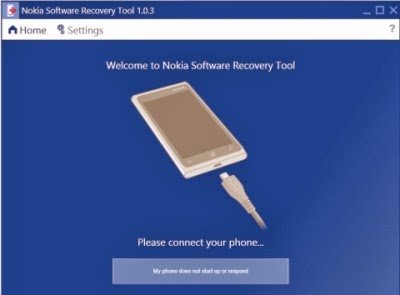
When the installation has finished, start the application and the main screen will appear:
Summary
This wiki article walks you through the procedure you can try if your phone goes into a bricked state (as a last resort before contacting Nokia Care).
Details
If your Nokia Lumia stops responding, appears to be stuck or isnt starting, you can give Nokias Software Recovery Tool a try before sending your phone off to Nokia Care. The tool can also be used on phones that appears to have software problems or software update problems. The tool is meant for home use and will only work with Windows Phone 8 devices.
Please note that your phone will be reset to factory status when using this tool. .
Start by downloading and installing Nokia Software Recovery Tool (for Windows 8.x and 7) from here:
http://download.fds-ncom.nokia.com/supportFiles/phones/files/recovery/NokiaSoftwareRecoveryToolInstaller.exe
When the installation has finished, start the application and the main screen will appear:
The procedure to restore your phone using Nokia Software Recovery Tool is as follows:
1.Disconnect all phones from your computer and click the big button titled My phone does not start up or respond.
2.A new screen will appear asking you to disconnect any phones, simply click Continue.
3.Now connect the phone to your PC (using the USB cable that came with the phone).
4.Finally you will be notified about the version that will be installed on your phone and you need to click Install to start the flashing your phone.
Nokia Software Recovery Tool will then download and install the latest ROM available for your phone.
Too complex or cant get it to work?
If this is too complex or you just cant get it to work, contact your local Nokia Care center.
Source: Windows Forum
Writer : 7thSense
Available link for download
Subscribe to:
Posts (Atom)